| View previous topic :: View next topic |
| Author |
Message |
Mack
Jammer

Joined: 10 Dec 2005
Posts: 21
Location: UK
|
 Posted: Sat Dec 10, 2005 9:05 pm Post subject: Crashing in SL2 Posted: Sat Dec 10, 2005 9:05 pm Post subject: Crashing in SL2 |
 |
|
Hi All,
I bought the jamboree pack a couple of days ago
(Ver 1.42) and knocked up a simple bluesey backing track to play around with.
Superb! Just what I've been looking for for the past 5 years. BUT...............my system keeps crashing. Usually freezes with horrible buzzing noises and occasionally the dreaded blue screen.
I have a PC dedicated to music production with all the optimisations that you find on the web (no internet, no games, background services, features turned off, etc.). It didn't do this before. Perhaps I've turned too many features off?
I love what this software does but worry about using it seriously, help would be much appreciated.
I can send the mp3 if it would help?
P.S. I noticed a little glitch:
In the Mapping Tab, when you hover over the output slider it says "6% controls the pitch of the sound", doesn't seem right to me or am I missing something?
_________________
Regards to all
Mack
Windows XP-SP2 Home Ed.
Intel Core2 Duo
2Gb Ram
CUBASE SL3
EDIROL DA-2496 |
|
| Back to top |
|
 |
Ralph [RZ]
Site Admin

Joined: 02 Jan 2008
Posts: 13332
|
| Posted: Sun Dec 11, 2005 1:48 am Post subject: |
|
|
Hi Mack,
Please try the latest Jamstix beta and see if it helps, it will also fix the glitch you found:
http://rayzoon.com/v-web/bulletin/bb/viewtopic.php?t=857
Your crashes sound driver-related. If you get a blue screen, please tell us the exact error message.
Thanks!
_________________
Ralph Zeuner
Rayzoon Technologies LLC
http://www.rayzoon.com |
|
| Back to top |
|
|
RockMe
Jammer
Joined: 08 Sep 2005
Posts: 38
|
| Posted: Sun Dec 11, 2005 8:12 am Post subject: |
|
|
Hi
I've notice this problem to in Cubase SX3.
And what happens to me sometimes, not all the time, are that if you have booth cubase output an input set to jamstix and set input to not connected and jump into cubase piano roll for some fine fiddling and hit start, the input have jumped back to jamstix and I have this noice, crash, freez thing. And evan if you hit stop it can take like a minute or so before the noice stop or you have a system crash, very strange. The latest beta does not do this as often but it happens. |
|
| Back to top |
|
|
RockMe
Jammer
Joined: 08 Sep 2005
Posts: 38
|
| Posted: Sun Dec 11, 2005 8:17 am Post subject: |
|
|
| Ahh it just happend again but this time I saved the project yesterday with cubase input set to not connected and when I opend the project today the input was back to jamstix, no crash but terrible noice. |
|
| Back to top |
|
|
Ralph [RZ]
Site Admin
Joined: 02 Jan 2008
Posts: 13332
|
| Posted: Sun Dec 11, 2005 9:53 am Post subject: |
|
|
Yes, if input and output=Jamstix and you are in manual mode, you will get a MIDI feedback loop that can freeze and/or crash the machine. This is not a bug but a normal phenomenon. We are trying to find a way for JS to detect a feedback loop and break it.
Btw, the output slider tooltip bug is still in the latest beta, we will fix it in the next one. Thanks!
_________________
Ralph Zeuner
Rayzoon Technologies LLC
http://www.rayzoon.com |
|
| Back to top |
|
|
Mack
Jammer
Joined: 10 Dec 2005
Posts: 21
Location: UK
|
| Posted: Sun Dec 11, 2005 10:42 am Post subject: |
|
|
Thanks both, I'll check these things out and come back
_________________
Regards to all
Mack
Windows XP-SP2 Home Ed.
Intel Core2 Duo
2Gb Ram
CUBASE SL3
EDIROL DA-2496 |
|
| Back to top |
|
|
greenstratman
Jam Meister

Joined: 16 Aug 2005
Posts: 95
|
| Posted: Sun Dec 11, 2005 5:48 pm Post subject: |
|
|
hi
i've had crashes in sl2. updating graphics drivers stopped then straight away. also if you have more than one instance of audio m8 open this can cause a crash, although when it happened to me it was only when exiting sl2.
cheers
kevin |
|
| Back to top |
|
|
Mack
Jammer
Joined: 10 Dec 2005
Posts: 21
Location: UK
|
| Posted: Sun Dec 11, 2005 7:10 pm Post subject: |
|
|
I've spent a good few hours working on a new track today. This time I ran Jamsix in manual mode as a stand alone VST instrument instead of associating it with a drum track (i.e. no drum track in SL at all). I had no problems for hours whilst working with Jamstix.Then I started working on the Bass track in Sfz which was Ok for a while then the nasty noises appeared but only once!
After I'd exited Cubase I got a blue screen with something about "IRQL".
It makes me think the Zauni is right and I have a driver problem but I haven't a clue as to how to sort this out.
Kevin - thanks for your comment, I'm not using any instances of Audio m8 as I'm in manual mode but I did recently upgrade from my old GeForce MX (which was rock steady) to a FX5200 and I wonder?
I guess I'll just have to try an see if a pattern emerges........ahh the pleasures of PC's?
Zauni - not wishing to patronise but in two days this little gem has made a huge leap in the quality of my modest efforts! Even with this problem it's worth every penny and I've not even tried the Drumpacks yet!
_________________
Regards to all
Mack
Windows XP-SP2 Home Ed.
Intel Core2 Duo
2Gb Ram
CUBASE SL3
EDIROL DA-2496 |
|
| Back to top |
|
|
Ralph [RZ]
Site Admin
Joined: 02 Jan 2008
Posts: 13332
|
| Posted: Sun Dec 11, 2005 7:32 pm Post subject: |
|
|
| Mack wrote: | After I'd exited Cubase I got a blue screen with something about "IRQL".
|
The two top reasons for this are:
a) Graphics or audio driver problem
b) Bad memory
If it's bad memory then other blue screens will have other errors, like paging error etc. If it's consistently IRQL then it's a video/audio driver issue. The fact that you recently upgraded your card makes it very likely that it's a video driver issue. Please go to the nvidia web site and upgrade to the latest driver for your card.
You may also want to research IRQ sharing of your video card in the device manager.
Also, the blue screen may mention the DLL that the error occurred in. This would tell us 100% if its the video card so please note that name if you get it again.
| Quote: |
Even with this problem it's worth every penny and I've not even tried the Drumpacks yet! |
Thanks! You should definitely check out the Paks though since they significantly improve the realism of the internal engine.
_________________
Ralph Zeuner
Rayzoon Technologies LLC
http://www.rayzoon.com |
|
| Back to top |
|
|
drummix
Jammer
Joined: 03 Aug 2005
Posts: 44
Location: France
|
| Posted: Mon Dec 12, 2005 8:27 am Post subject: |
|
|
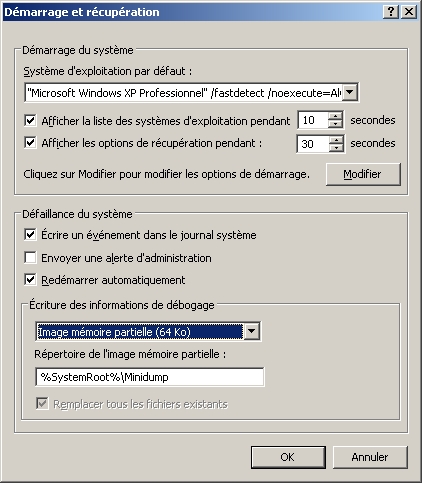
analyzing the crash dump file with Microsoft Windbg can help to find the culprit dll or driver
but if you want to download the whole symbols table, be aware that it takes 800 MB
 |
|
| Back to top |
|
|
Ralph [RZ]
Site Admin
Joined: 02 Jan 2008
Posts: 13332
|
| Posted: Mon Dec 12, 2005 2:06 pm Post subject: |
|
|
| RockMe wrote: | | Ahh it just happend again but this time I saved the project yesterday with cubase input set to not connected and when I opend the project today the input was back to jamstix, no crash but terrible noice. |
Set the input to your MIDI keyboard or something like that and SX won't set it back to Jamstix after a close/reopen. It appears to only do that if the input is set to None.
_________________
Ralph Zeuner
Rayzoon Technologies LLC
http://www.rayzoon.com |
|
| Back to top |
|
|
RockMe
Jammer
Joined: 08 Sep 2005
Posts: 38
|
| Posted: Tue Dec 13, 2005 2:57 am Post subject: |
|
|
| Quote: | Set the input to your MIDI keyboard or something like that and SX won't set it back to Jamstix after a close/reopen. It appears to only do that if the input is set to None.
|
Thanks Ralph, that worked just fine. |
|
| Back to top |
|
|
Mack
Jammer
Joined: 10 Dec 2005
Posts: 21
Location: UK
|
| Posted: Thu Jan 05, 2006 7:38 pm Post subject: |
|
|
Hi
Just coming back to say thanks to Greenstratman, Rockme, Drummix and Ralph for the help and to let you know how I went on.
I did the following:
1. Checked that I had no IRQ sharing.
2. Installed my old GeForce MX400 video card, various posts on the net suggested this card might be a bit dodgy?
3. In Cubase I set Audio priority to "Very High" and preload to "5 seconds" in Device Setup. (Which seemed to make a big difference)
I also took advice from a thread on the Cubase forum and set "Do not map through this device" for my DA-2496 in Control Panel/Sounds and Audio Devices/Hardware.
The problem seems to have gone away and I don't really know what did the trick. Sorry for not doing a very scientific analysis but I just wanted to get back to making music and sort of grabbed everything going. Maybe this will help somebody?
I don't think this was a Jamstix related issue.
Ralph - My parting shot is that I've done 3 new songs with Jamstix and tried out the extra kits as you recommended but when I re-visit them there doesn't seem to a way to identify which kit I used for that particular song. Is there a way of seeing this in the Jamsix GUI?
I'm using beta 8-10.
I'm having a ball with this software and desperately trying to resist the temptation to go back and re-do the drum tracks for my older stuff. Somehow I think my will-power will fail..............thanks for the best 70 quid I've spent for a long while!
_________________
Regards to all
Mack
Windows XP-SP2 Home Ed.
Intel Core2 Duo
2Gb Ram
CUBASE SL3
EDIROL DA-2496 |
|
| Back to top |
|
|
Ralph [RZ]
Site Admin
Joined: 02 Jan 2008
Posts: 13332
|
| Posted: Thu Jan 05, 2006 9:11 pm Post subject: |
|
|
| Mack wrote: | I've done 3 new songs with Jamstix and tried out the extra kits as you recommended but when I re-visit them there doesn't seem to a way to identify which kit I used for that particular song. Is there a way of seeing this in the Jamsix GUI?
|
Since the kit saves into the song project you can easily end up with a unique kit but if you haven't made any changes then the best way to identify the kit is to look at the snare name in the mapping tab and look for any of these markers in the name.
DP1=DrumPak 1
DP2=DrumPak 2
CS=Closed Stereo
BP=BrushPak
JP=BrushPak
None of the above=Default Kit
(This is not all inclusive but covers the majors)
_________________
Ralph Zeuner
Rayzoon Technologies LLC
http://www.rayzoon.com |
|
| Back to top |
|
|
|

 FAQ
FAQ Search
 Memberlist
 Usergroups
 Register
 Profile
 Log in to check your private messages
 Log in


