| View previous topic :: View next topic |
| Author |
Message |
Dewdman42
Grand Master Jam

Joined: 24 Aug 2006
Posts: 326
|
 Posted: Thu Jul 24, 2025 1:37 pm Post subject: Posted: Thu Jul 24, 2025 1:37 pm Post subject: |
 |
|
yea so I was able to manually copy those folders over, also the VST plugins...and Jamstix did still seem to work, but its not useable. The GUI, similar as jamstix manager does not do window redraws correctly under crossover and so it blinks on and off and basically is unusable. I can see it flash up just long enough to see it loaded, but as you move the mouse around the GUI appears and disappears, basically unusable. On top of that the main configuration menu of audiogridder is located from the taskbar icon in windows and crossover doesn't make the taskbar available. There is a text cfg file related to audiogridder, it might be possible to configure that in some way instead of using its taskbar settings menu, but I didn't bother trying because jamstix itself I think will not work with current crossover wine due to whatever toolkit Ralph used for J4. It worked with J3 in the past.
So anyway its back to VMWare Fusion or perhaps UTM, I am going to make a new install with a more minimally sized win11 VM to try to get the size down to maybe 20gb if I'm lucky. Also UTM supports shared folders and VMWare fusion currently does not.
Ultimately I will probably end up setting up a small windows PC to run nothing but Jamstix on it in either audiogridder or VSL VePro. I actually have an all in one PC here that I retired from my mom's use, it is not really useful for much of anything because the ports on it are too slow to become a NAS and its an i5 which is just not very much. But it's probably enough to run Jamstix... so...why not. Give it a purpose.
VePro is superior and supported, audiogridder actually has a number of bugs and the developer appears to be MIA. One thing it does do that is cool is screen scrape the plugin gui and bring it over to the client side so you don't have to have a Remote Desktop window open over to the server. its really cool free software when it works, for now I will use that with VMWare...and just kind of skirt around some of these little bugs, it is possible to make tracks and get music done with the genius of Jamstix,
which as we all know is simply unchallenged for AI drums. Both LogicPro and Cubase have mediocre AI drummers, but they just pale in comparison to Jamstix...it's not even remotely close. Jamstix is a work of art. I will never stop trying to find ways to make it work. I think in 10 years from now if it stops working on Windows13 or whatever I will run an old PC on win11 just to host jamstix and access it with VePro (or maybe audiogridder if it developers more). Presuming we never hear from Ralph again or see a J5, which at this point I find highly unlikely.
After I redo it with UTM I will post instructions here for how to set it up this way, I think its a useful alternative for Mac users, though I'm hard pressed to justify paying for jamstix with intention of using on a Mac, but if someone is really motivated it might be worth it. It was worth it for me back in the J3 days. But most people would probably not want to spend the money on something that has to be rigged up this way to work, but nonetheless it does work and some Mac users may appreciate being able to do it. |
|
| Back to top |
|
 |
Dewdman42
Grand Master Jam
Joined: 24 Aug 2006
Posts: 326
|
| Posted: Thu Jul 24, 2025 8:19 pm Post subject: |
|
|
Here are steps to setup jamstix in windows VM on a Mac. Works great on both Intel or ARM Macs.
Installation Steps
- Download the windows11 installer, if you're on Apple Silicon make sure to download the ARM version of win11. This downloads as a bootable ISO file:
https://www.microsoft.com/en-us/software-download/windows11
- Download either UTM or VMWare Fusion, they are both free. I ended up preferring UTM because VMWare Fusion doesn't support shared folders on the ARM version and UTM does. But I found they both work very well. UTM is open source if you care.
UTM: https://mac.getutm.app
- Create the VM, in UTM you will want to create a new VM and select "Virtualize", set some options, select the Win11 iso you downloaded above and create the actual VM, which will run the win11 installer for you.
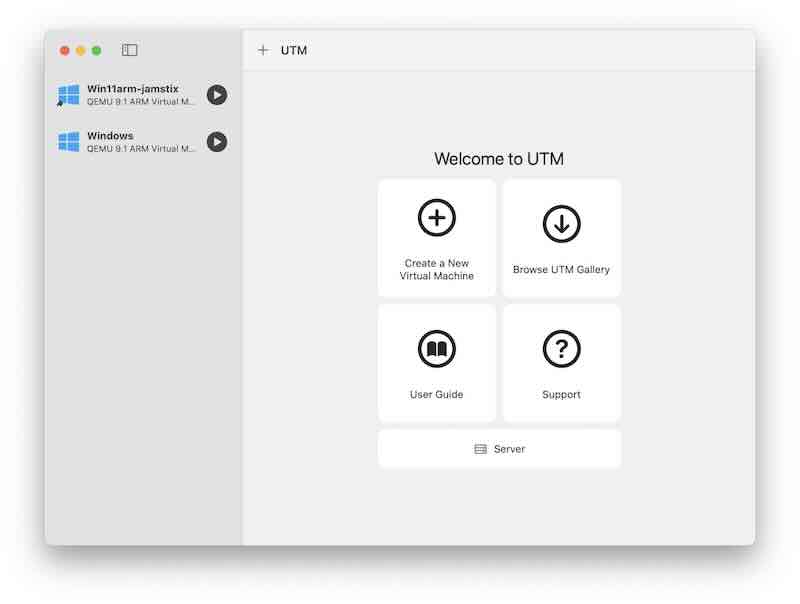
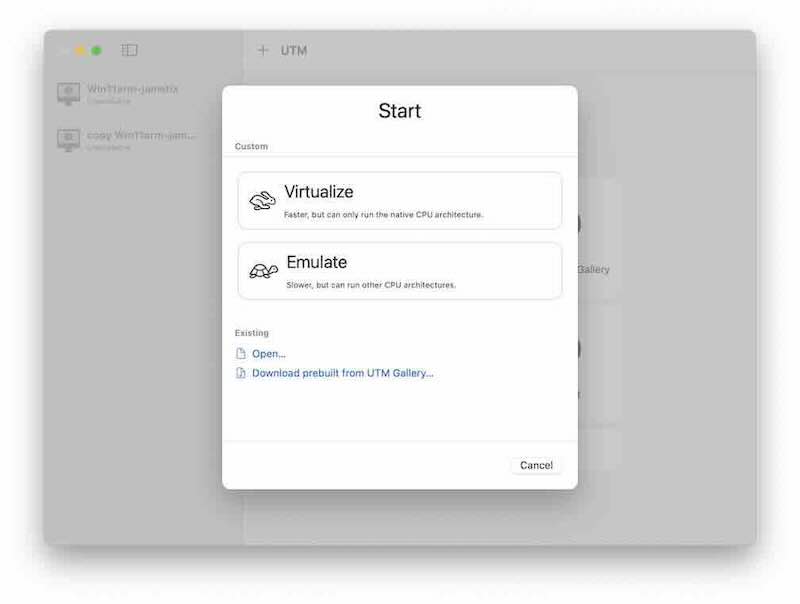
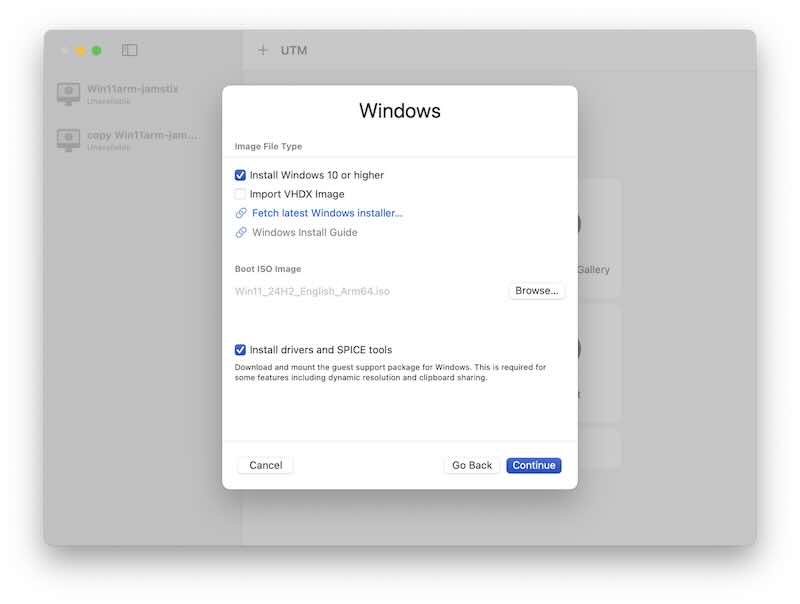
I leave it to you to look into how to keep win11 installation size smaller, to avoid Microsoft online account, etc.. there are instructions on the internet about this. I was able to get my final VM size including jamstix down to about 22gb and completely debloated.
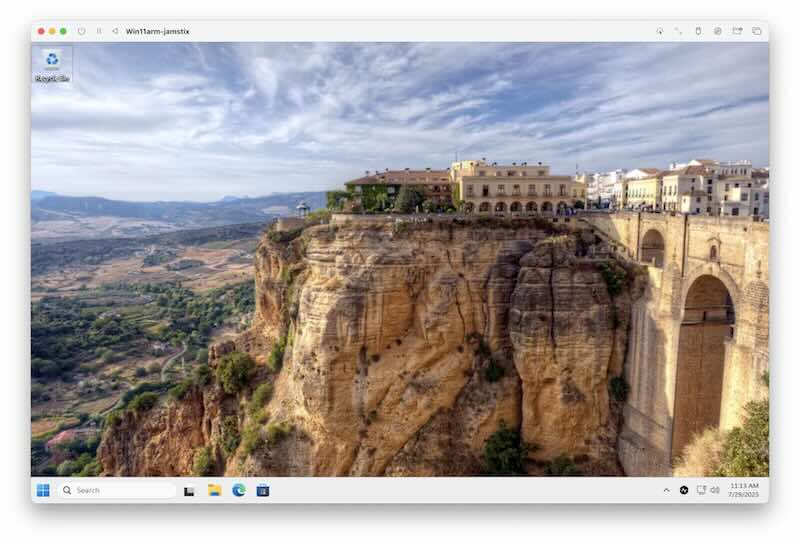
- Once you have Windows11 installed as a VM and working to your satisfaction, then install Audiogridder server into the VM, found here:
https://audiogridder.com
Note there are a lot of binaries there, make sure you're installing the server and the windows version, which currently is only available as intel.
- While you're at the audiogridder website also download the Mac plugin installer. Note that there are separate installers for Intel or ARM version on Mac, make sure you're downloading the correct one for your mac.
- After installing the Mac plugin, go back to the VM window, and launch the AudioGridderServer.exe app
| Code: | | C:\Program Files\AudioGridderServer\AudioGridderServer.exe |
You won't see any normal window open, but check the task bar hidden icons to find the icon for audiogridder and select the Settings menu item.
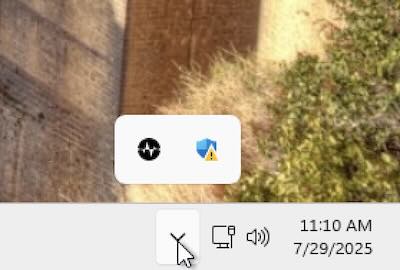 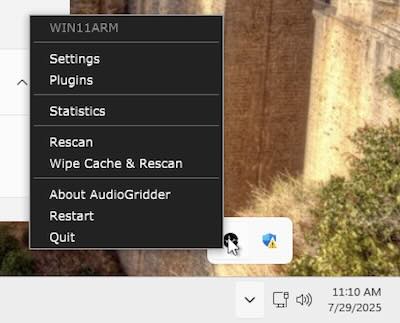
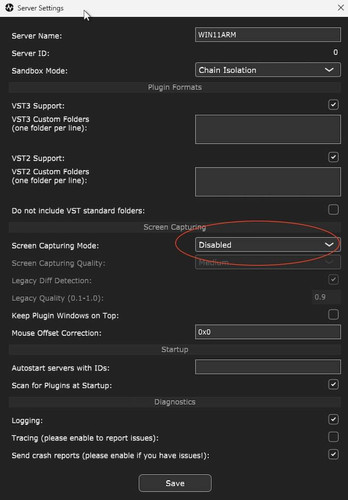
In Settings, make sure to set the screen capturing mode to disabled. Otherwise, everything else as you wish. Take note of the name of the server at the top.
download the Windows jamstix manager into your VM and run it, install Jamstix into the VM.
Hide the VM window and on your Mac install the audiogridder Macintosh plugin that you downloaded earlier.
Launch your Mac DAW and make sure it scans for new plugins. Create an instrument track, insert the AudioGridder instrument plugin. The following window will come up for the plugin.
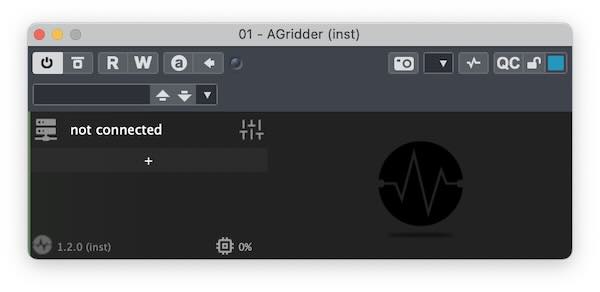
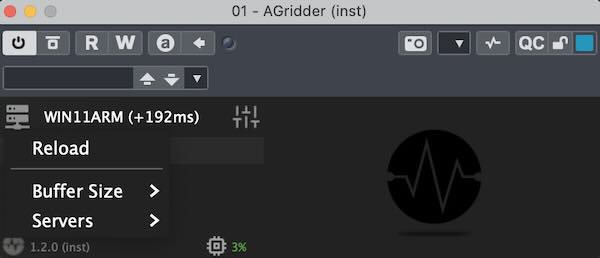
Note it may or may not initially find your audiogridder server automatically, if not it will look like above and say "not connected". If it does not find it you can click on the icon on the top left of the plugin and go to the Servers menu item to find the server and reconnect to it.
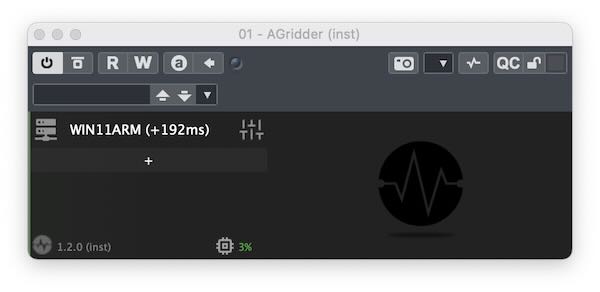
Now click on the + button below the server name to look for the jamstix inst plugin and load it.
Once it's loaded the plugin window will look like this, with the jamstix button highlighted in orange. Clicking on the jamstix button will turn orange highlighting on and off, which you you will later discover also displays and hides the actual jamstix GUI from showing over in the VM window.
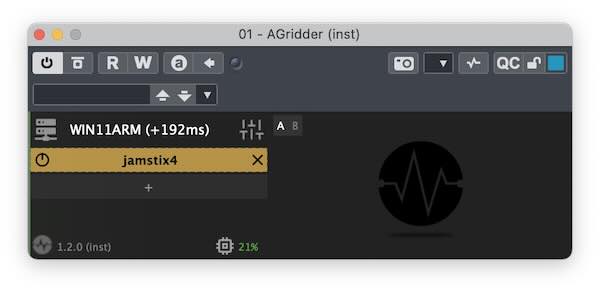
Make sure that button is highlighted orange and go back to the VM window and you will see Jamstix GUI up and ready to use.
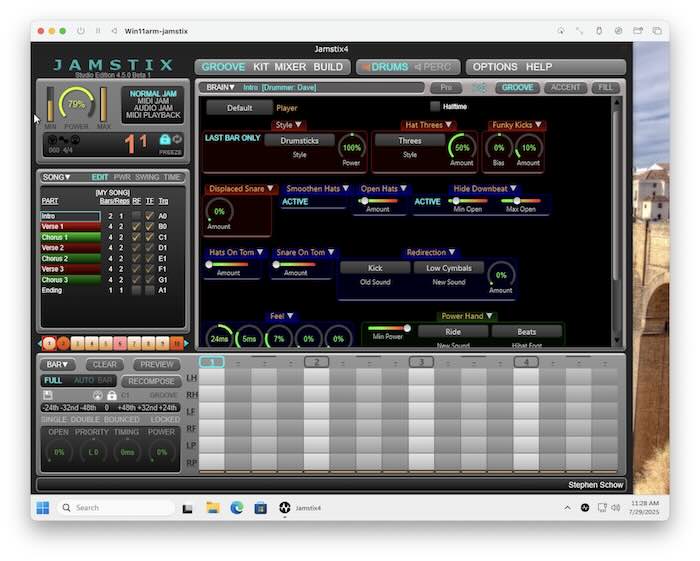
load a song into jamstix through the jamstix GUI (in the VM window)
go back to your DAW and hit play....hear jamstix play. You did it.
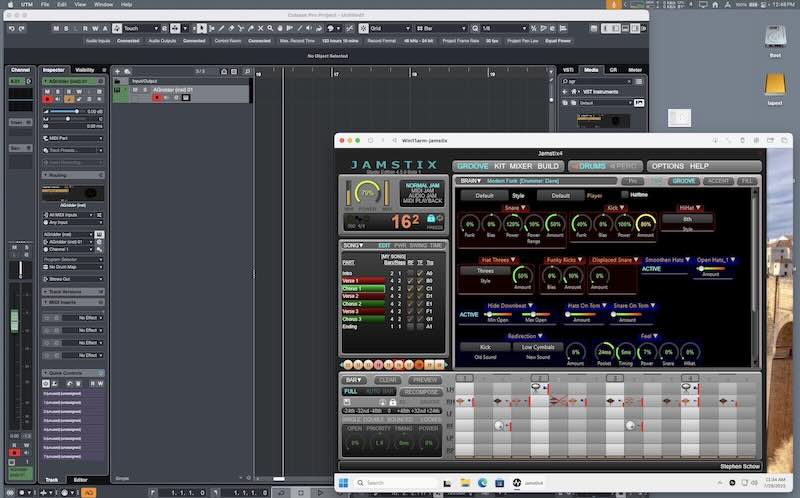
Additional Notes
- you can easily switch back and forth between your DAW and the VM window in order to control Jamstix from the VM window, make all the changes, while your Mac daw is playing it. It's all sample accurate too in terms of jamstix sounds.
- If you are wanting to use 3rd party sounds such as SuperiorDrummer I do not recommend using midiout from audiogridder as audiogridder doesn't correct the latency of midi out. Instead use the jamstix sounds to develop your drum parts and then when completely finished export the midi from jamstix using the midi drum mapping you need, to bring back exported midi files back over to your Mac daw and import as midi in order to use different drum sounds.
- If you absolutely must hear it from jamstix through 3rd party sounds before exporting anything, then the best approach will be to also install your 3rd party drum libraries into your Windows VM and create a plugin chain so that the midi will not need to come back across the network to your Mac DAW, it will still be sample accurate audio that way.
- Its also possible to get the midi out from jamstix to come back over the network into your MacDAW to host 3rd party drum sounds there, but the latency correction is totally wrong and will take some manual correction and in my experience so far I found the timing flakey that way. Its good enough to hear it while you work it out, but I would strongly recommend you export the final midi file out of jamstix and bring that back to your MacDAW to run through 3rd party sounds as midi tracks at that point when its all ready.
- Audiogridder has the ability to screen scrape the UI directly into your DAW so that you don't have to go back and forth between the VM window and your Mac DAW, but I found that mode a little more error prone at times and it's not necessary when it's all on the same machine anyway. But if you want to try that, go into audiogridder settings and change the screen capture mode I mentioned in a previous step above.
- I was able to shrink my win11 down to about 22gb, with just this stuff installed. That's about as small as you can get it honestly if it's a little bigger don't worry about it. It works! For me this is perfectly usable.
- Note that audiogridder and UTM are both totally free open source. Windows11 is not, but you can freely download it and install and use it indefinitely as a VM without actually activating it, you won't be able to customize appearance personalization unless you pay for it and activate it, but you don't really need to for this use case.
- One other note about LogicPro, apparently some recent version of LogicPro broke compatibility with audiogridder and the dev of audiogridder has been MIA for two years, don't know if or when that will be fixed. However you can still get audiogridder plugin to work in logicPro by wrapping one of the plugin hosting plugins around it, such as Kushview Element, DDMF metaplugin, bluecataudio's patchwork, plogueBidule, Unify, etc.. Those all work properly to host the audiogridder plugin and hence it will then still be available inside LogicPro also. I have tested this and it's working fine.
- I recommend you print out this post to a PDF file because I cannot guarantee that in the future these image links will continue to work.
Jamstix on the Mac lives on!!

Last edited by Dewdman42 on Wed Jul 30, 2025 12:30 pm; edited 3 times in total |
|
| Back to top |
|
|
Dewdman42
Grand Master Jam
Joined: 24 Aug 2006
Posts: 326
|
| Posted: Tue Jul 29, 2025 7:25 pm Post subject: |
|
|
I updated VM instructions with screenshots. Anyone wanting to run Jamstix on a Mac should seriously try this, honestly I think it works better then any other previous method that has ever been done, including the Mac version of Jamstix that never really worked quite right.
The other alternative is to use audiogridder and everything just like I explained above, but host audiogridder and jamstix on an actual separate Windows PC you have laying around the house. I also have that setup on a fairly old and slow PC and it works fine also but when its on a separate PC, then you have to use the screen capture mode to actually use the GUI unless the PC display is right there on your desk too...or Remote Desktop or something...all of which is is not quite as easy and smooth to use as the VM method above imho. But also with a separate PC you can use VSL Vepro instead of audiogridder, not free, but very solid supported software.
let me know if questions. Good luck, god bless Ralph and hope he's ok. |
|
| Back to top |
|
|
Azimuth
Moderator & Beta Team

Joined: 19 Nov 2010
Posts: 2131
|
| Posted: Tue Jul 29, 2025 7:43 pm Post subject: |
|
|
| That's awesome Dewdman, extremely cool of you to figure this all out for others, excellent tutorial. |
|
| Back to top |
|
|
plectrum_boy
Jammer

Joined: 30 Dec 2016
Posts: 44
|
| Posted: Sun Nov 09, 2025 4:52 pm Post subject: |
|
|
| Well done Dewdman, that's an excellent piece of work to share. |
|
| Back to top |
|
|
|
|
You cannot post new topics in this forum
You cannot reply to topics in this forum
You cannot edit your posts in this forum
You cannot delete your posts in this forum
You cannot vote in polls in this forum
|
Powered by phpBB © 2001, 2002 phpBB Group
|

 FAQ
FAQ Search
 Memberlist
 Usergroups
 Register
 Profile
 Log in to check your private messages
 Log in


