| View previous topic :: View next topic |
| Author |
Message |
jdockerty_1
Jammer

Joined: 07 Dec 2018
Posts: 31
|
 Posted: Thu Sep 05, 2019 6:15 pm Post subject: Posted: Thu Sep 05, 2019 6:15 pm Post subject: |
 |
|
| Just been testing 4.4 for Mac, all seems perfect, just that same issue with visuals when moving the overall plugin interface like the interface is getting left behind when moved. Kits play perfect now no stoppage visually. Love it!!! |
|
| Back to top |
|
 |
Ralph [RZ]
Site Admin

Joined: 02 Jan 2008
Posts: 13332
|
| Posted: Thu Sep 05, 2019 6:22 pm Post subject: |
|
|
| jdockerty_1 wrote: | | Just been testing 4.4 for Mac, all seems perfect, just that same issue with visuals when moving the overall plugin interface like the interface is getting left behind when moved. Kits play perfect now no stoppage visually. Love it!!! |
Thanks, mate! Yes, we still need to run Jamstix in a dedicated process on macOS at this time and that means overlaying the GUI because macOS does not allow sharing a window with another process.
_________________
Ralph Zeuner
Rayzoon Technologies LLC
http://www.rayzoon.com |
|
| Back to top |
|
|
jdockerty_1
Jammer
Joined: 07 Dec 2018
Posts: 31
|
| Posted: Thu Sep 05, 2019 6:48 pm Post subject: |
|
|
| Gotya 👍, I’ll keep testing. Thanks again 🤘🔥🤘 |
|
| Back to top |
|
|
robojam_
Jammer
Joined: 24 Aug 2008
Posts: 45
|
| Posted: Wed Oct 09, 2019 8:52 am Post subject: |
|
|
| Ralph, how is beta testing going? Will there be a final release soon? |
|
| Back to top |
|
|
apesma_1
Jammer
Joined: 14 Jan 2016
Posts: 34
|
| Posted: Wed Oct 23, 2019 9:42 pm Post subject: |
|
|
Hi All,
I get a unicode "No Mapping" error when I select the Funk/6-8 Funk Style.
For this test, I'm using Reason 10 on Mac OS X Mojave 10.14.6
Anyone else getting this?
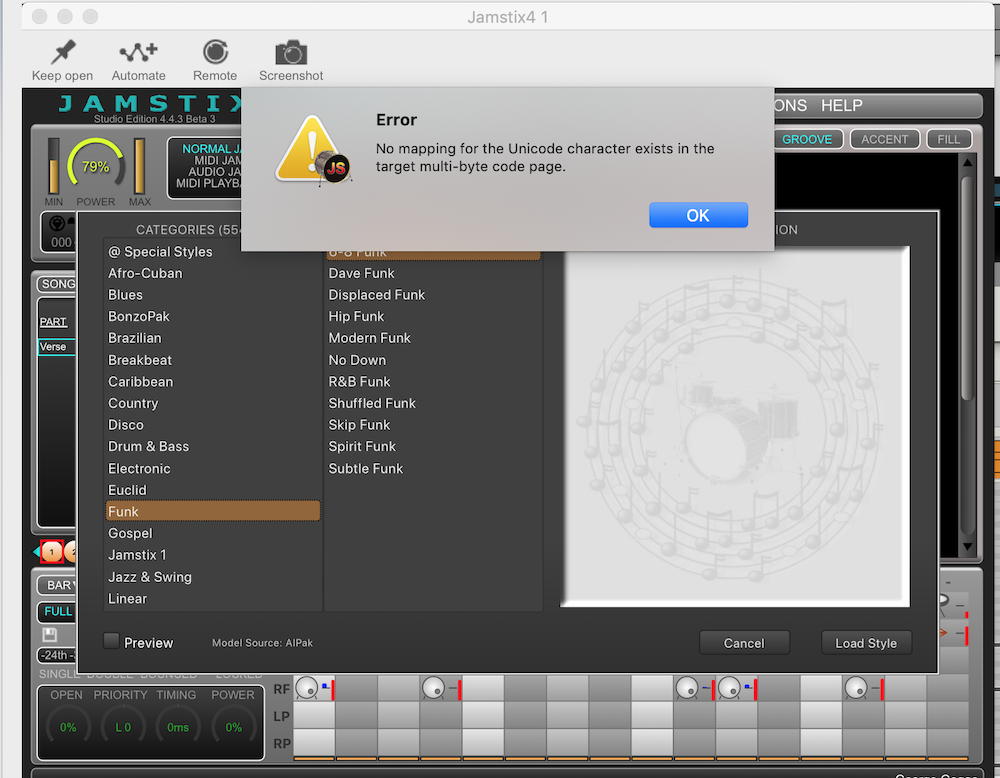 |
|
| Back to top |
|
|
bvaughn_0402
Junior Jammer

Joined: 12 Jan 2014
Posts: 2
|
| Posted: Tue Oct 29, 2019 10:18 pm Post subject: White screen |
|
|
Been away from Jamstix for a while, and tonight tried to upgrade to the 4.4.3 Beta 3.
When I pull it up in Logic Pro X, all I see is a white screen.
I've tried Repairing it, and reinstalling it. But always the same.
Update ... rebooted and think I was loading the older version. When I opened Ver 4, now it comes up to a black screen with "Loading Jamstix" ... but never loads.
Any ideas? |
|
| Back to top |
|
|
Ralph [RZ]
Site Admin
Joined: 02 Jan 2008
Posts: 13332
|
| Posted: Sat Nov 02, 2019 10:00 am Post subject: Re: White screen |
|
|
| bvaughn_0402 wrote: | Been away from Jamstix for a while, and tonight tried to upgrade to the 4.4.3 Beta 3.
When I pull it up in Logic Pro X, all I see is a white screen.
|
Please email me these files from /Music/Jamstix4/Logs if they exist:
- Jamstix Plugin Log.txt
- Jamstix Server Log.txt
- error.txt
_________________
Ralph Zeuner
Rayzoon Technologies LLC
http://www.rayzoon.com |
|
| Back to top |
|
|
Ralph [RZ]
Site Admin
Joined: 02 Jan 2008
Posts: 13332
|
| Posted: Sat Nov 02, 2019 12:15 pm Post subject: |
|
|
| apesma_1 wrote: | Hi All,
I get a unicode "No Mapping" error when I select the Funk/6-8 Funk Style.
For this test, I'm using Reason 10 on Mac OS X Mojave 10.14.6
|
This problem has been fixed. Please run the manager and let it update.
_________________
Ralph Zeuner
Rayzoon Technologies LLC
http://www.rayzoon.com |
|
| Back to top |
|
|
apesma_1
Jammer
Joined: 14 Jan 2016
Posts: 34
|
| Posted: Tue Nov 05, 2019 8:53 pm Post subject: |
|
|
| Ralph [RZ] wrote: | | apesma_1 wrote: | Hi All,
I get a unicode "No Mapping" error when I select the Funk/6-8 Funk Style.
For this test, I'm using Reason 10 on Mac OS X Mojave 10.14.6
|
This problem has been fixed. Please run the manager and let it update. |
Working. Thanks Ralph! |
|
| Back to top |
|
|
plectrum_boy
Jammer
Joined: 30 Dec 2016
Posts: 44
|
| Posted: Tue Nov 12, 2019 10:01 am Post subject: |
|
|
Absolutely brilliant stuff - 4.4 working superbly on Catalina in Cubase 10! This means Ralph has got Jamstix working in Cubase/Cataline before Groove Agent 5.
Excellent programme that has become my favourite drum module, thank you thank you Rayzoon.
Steve. |
|
| Back to top |
|
|
Nigo
Jammer
Joined: 10 Mar 2007
Posts: 31
|
| Posted: Mon Nov 18, 2019 12:57 pm Post subject: Disable advanced/3D graphics? |
|
|
I’m on Logic Pro and High Sierra, mid 2011 iMac. It seems like the 3D graphics is requiring a lot of resources and it is not really doing anything for me. Dragging the interface around is very laggy and whenever I go into the kit the computer slows down.
Is there anyway I can disable it completely? I already searched the settings menu and disabled whatever graphic related I found (I’m not at my Mac now, so can’t be specific).
Maybe this is a future request  Get back to version 1 drum kit GUI Get back to version 1 drum kit GUI  |
|
| Back to top |
|
|
bvaughn_0402
Junior Jammer
Joined: 12 Jan 2014
Posts: 2
|
| Posted: Mon Dec 02, 2019 2:10 pm Post subject: Re: White screen |
|
|
| Ralph [RZ] wrote: | | bvaughn_0402 wrote: | Been away from Jamstix for a while, and tonight tried to upgrade to the 4.4.3 Beta 3.
When I pull it up in Logic Pro X, all I see is a white screen.
|
Please email me these files from /Music/Jamstix4/Logs if they exist:
- Jamstix Plugin Log.txt
- Jamstix Server Log.txt
- error.txt |
Hi, I emailed these back in early Nov. Did you get them? |
|
| Back to top |
|
|
Ralph [RZ]
Site Admin
Joined: 02 Jan 2008
Posts: 13332
|
| Posted: Mon Dec 02, 2019 2:31 pm Post subject: |
|
|
Yes, thank you. We are working toward a new Beta on 12/9 to fix various issues.
_________________
Ralph Zeuner
Rayzoon Technologies LLC
http://www.rayzoon.com |
|
| Back to top |
|
|
jdockerty_1
Jammer
Joined: 07 Dec 2018
Posts: 31
|
| Posted: Wed Dec 04, 2019 5:53 am Post subject: Fill speed option |
|
|
Hey,
I don’t know if this is possible or not but would it be possible to get a burst speed knob in the fill section? Just for slowing down the speed of some fills etc. Would be awesome, I know there is the speed selections in the options menu, but was just thinking last night it would be really handy to have an option in the fill section.
Thanks 🙏 |
|
| Back to top |
|
|
Ralph [RZ]
Site Admin
Joined: 02 Jan 2008
Posts: 13332
|
| Posted: Wed Dec 04, 2019 3:27 pm Post subject: Re: Fill speed option |
|
|
| jdockerty_1 wrote: | Hey,
I don’t know if this is possible or not but would it be possible to get a burst speed knob in the fill section? Just for slowing down the speed of some fills etc. Would be awesome, I know there is the speed selections in the options menu, but was just thinking last night it would be really handy to have an option in the fill section.
|
Try the 'Simplifier' knob in the fill settings.
_________________
Ralph Zeuner
Rayzoon Technologies LLC
http://www.rayzoon.com |
|
| Back to top |
|
|
|

 FAQ
FAQ Search
 Memberlist
 Usergroups
 Register
 Profile
 Log in to check your private messages
 Log in


