| View previous topic :: View next topic |
| Author |
Message |
nexus_77_
Jammer

Joined: 05 Jul 2009
Posts: 26
|
 Posted: Thu Feb 24, 2011 12:33 am Post subject: Ok hopefully you guys can help and maybe we can all benefit! Posted: Thu Feb 24, 2011 12:33 am Post subject: Ok hopefully you guys can help and maybe we can all benefit! |
 |
|
have three tracks that I am trying to get as close to as possible. These kinds of styles are things I really would use a great deal, and I am hoping that maybe Ralph or someone else can steer me in the right direction. Ralph, You are an utter genius, by the way. I LOVE Jamstix, but I am somewhat stumped on these. The most important are the Radiohead: Airbag, and The Cure: Closedown, but the third is kind of tricky as well. I have made 30 to 40 second snippets of the trhee songs / styles in question and made a link for everyone to download them so you will know exactly what I am talking about. I am hoping that this will be very beneficial for everyone. I hope it's ok for me to post a link to the zip folder. You guys are Awesome! 
http://cid-2ec83fa440d6664c.office.live.com/embedicon.aspx/.Public/drum%20snippets%20for%20jamstix%20forum.zip |
|
| Back to top |
|
 |
Ralph [RZ]
Site Admin

Joined: 02 Jan 2008
Posts: 13332
|
| Posted: Fri Feb 25, 2011 5:30 pm Post subject: |
|
|
You're gonna have to hand-edit these in the bar editor and then use 'Turn Groove Into Style' in the bar menu.
_________________
Ralph Zeuner
Rayzoon Technologies LLC
http://www.rayzoon.com |
|
| Back to top |
|
|
Ralph [RZ]
Site Admin
Joined: 02 Jan 2008
Posts: 13332
|
| Posted: Fri Feb 25, 2011 5:38 pm Post subject: |
|
|
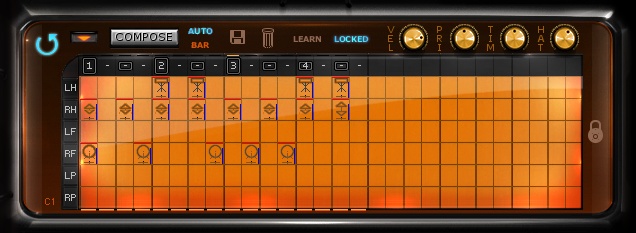
Here is the basic groove of the Radiohead song at 86BPM
_________________
Ralph Zeuner
Rayzoon Technologies LLC
http://www.rayzoon.com |
|
| Back to top |
|
|
nexus_77_
Jammer
Joined: 05 Jul 2009
Posts: 26
|
| Posted: Sat Feb 26, 2011 4:45 am Post subject: |
|
|
| Ralph, you are a genius. You just revealed to me a lot more than you think. This has opened a whole new world for me. It is exactly what I have been trying to do for a while. I added drummer elements until I liked it's playing and it is perfect! I now know how to do the National tune as well. The only tricky one left is the Cure song which I still don't really know how to do it where it will have the natural feel of all the toms, and not be static looped. Thank you SO MUCH for helping with this. |
|
| Back to top |
|
|
Ralph [RZ]
Site Admin
Joined: 02 Jan 2008
Posts: 13332
|
| Posted: Sat Feb 26, 2011 10:51 am Post subject: |
|
|
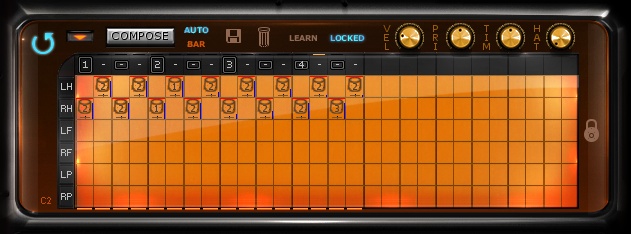
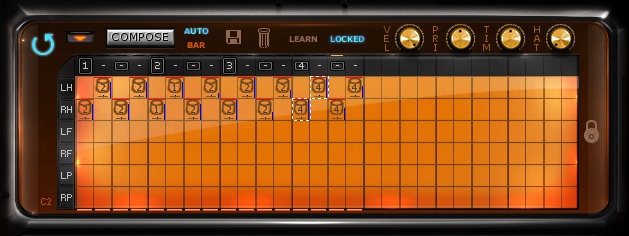
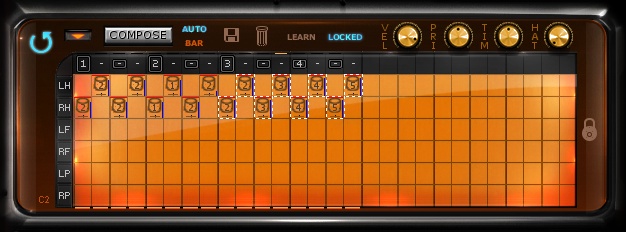
For the cure song I would create three bars like this:
M - MAIN GROOVE
B - VARIANT B
C - VARIANT C
Now create a 8 bar sequence in the bar editor as follows:
MMMBMMMC
Now go to the first bar and use 'Turn Groove Into Style' and make sure you tell it to use 8 bars.
Pick a drummer you like and add style elements as need be.
_________________
Ralph Zeuner
Rayzoon Technologies LLC
http://www.rayzoon.com |
|
| Back to top |
|
|
nexus_77_
Jammer
Joined: 05 Jul 2009
Posts: 26
|
| Posted: Tue Mar 01, 2011 7:48 am Post subject: |
|
|
Thank you again Ralph for taking the time to help me out. It is so impressive to find support as awesome as yours. I am genuinely amazed. I have to say that while I have had tremendous success now with the Radiohead and National approach, this one is a bit more difficult for me. I understand your instructions and followed them through, the problem is that I get a very mechanical steady velocity to the groove. If I load a drummer and vary the power of the hits this helps, but the problem is that the power variation is, as far as I can tell, random. I then went in and manually adjusted the velocity of each hit. This brought it to life a a great deal more, but it still doesn't quite do it. It is also difficult and rather tedious to adjust the velocity knob for every hit. The difficult part about it is not seeing exactly where the other hits' velocities are in relation to the current one. What would be amazing is if there were a way to play or draw in just velocities and have them be attached to the style as a guide. Maybe you could create a style element that looked like this:

Overall, FL Studio's approach to step editing is, by far the quickest and most intuitive I have ever encountered. I can hammer out a basic drum pattern in under a minute.
Maybe this can be done some other way that I don't know. It would be pretty cool to just be able to pound out 16th notes in a four or 8 bar pattern on just a single key just for jamstix to record velocity information.
Anyway, this kind of easy velocity control seems to me to be pretty important when constructing these types of tom grooves, since the majority of their variance seems to come from it. |
|
| Back to top |
|
|
Ralph [RZ]
Site Admin
Joined: 02 Jan 2008
Posts: 13332
|
| Posted: Tue Mar 01, 2011 10:55 am Post subject: |
|
|
The blue horizontal line in the cells in my screenshots is the velocity (yours is red). Please try to match the velocities as shown in the screenshots to get a good performance. You can use select one or more cells and use the mousewheel to adjust it. Focusing on the red velocity lines will give you a feel for the relations between hits.
_________________
Ralph Zeuner
Rayzoon Technologies LLC
http://www.rayzoon.com |
|
| Back to top |
|
|
nexus_77_
Jammer
Joined: 05 Jul 2009
Posts: 26
|
| Posted: Tue Mar 01, 2011 11:59 am Post subject: |
|
|
| You definitely got it better than I did on the velocity thing. I didn't realize that was the meaning of the red lines. Missed that in the manual. Very cool! Unfortunately, that brings up a bit of a problem that I have sort of been ignoring. I tried using my mouse wheel as you said, and it did, indeed work for a time. Then it stopped reponding to my mouse wheel. I have had this same problem with the interface often when trying to adjust a knob in jamstix with the mousewheel. It seems like jamstix loses focus, but I click on it to make sure it is selected and it still doesn't respond to the mouse wheel. It seems kind of random. Also, is there a way to select multiple non-adjacent hits in the editor? I have tried shift click and alt click to no avail. |
|
| Back to top |
|
|
|

 FAQ
FAQ Search
 Memberlist
 Usergroups
 Register
 Profile
 Log in to check your private messages
 Log in


