| View previous topic :: View next topic |
| Author |
Message |
alexis
PhD in Jamology

Joined: 13 May 2005
Posts: 454
|
 Posted: Sat Sep 26, 2009 12:48 pm Post subject: Posted: Sat Sep 26, 2009 12:48 pm Post subject: |
 |
|
Hi - I'm just a sub-noob, but the one thing I would love to see is the little graphics on the border of each cell in the bar editor be bigger. I'm talking about the things like two circles in the bottom, how open or closed the hi hat is, the red bar or yellow bar, those things.
They're really small on my computer!
Oh, and BTW, will JS3 be compatible with Cubase SX3? I hope so!
Thanks, Ralph, you are da Man!
_________________
Alexis
JS 3.6.1x64; Cubase 7.5.40 64 bit; i5-4570 3.2GHz, 16GB RAM; W7 SP1 64-bit on Samsung SSD 840 Pro 256GB; Seagate 1TB SATA 600 Audio Drive; UR28M; Motif8; UAD-2 Solo, BCF2K; TC Helicon VoiceOne; RevoicePro3 |
|
| Back to top |
|
 |
andrew_k
Jammer

Joined: 20 Mar 2005
Posts: 43
|
| Posted: Sat Sep 26, 2009 9:40 pm Post subject: |
|
|
| Ralph [RZ] wrote: | Hiring a GUI designer in itself apparently doesn't make a difference (after all, Scott Kane worked on this for quite a while). Furthermore, a GUI designer who doesn't understand the workflow of the product cannot possible devise a good design unless he/she follows the functionality of a similar, existing product.
I also recommend waiting with final judgment until you can all get your hands on the Beta (using this GUI compared to just looking at screenshots). We will have a public Beta for all Jamstix 2 owners.
As soon as Jamstix 3 is released, we will start an official Jamstix 4 GUI thread where we can all debate various new designs. |
Hi Ralph,
When not making music I work as a contract software developer (in C++, as well as various web bits and pieces). For instance, I wrote the entire eticketing website for the University of New Mexico. Years ago when studying computer science I did a couple of papers in user interface design. Some of the criticism of the new Jamstix interface may stem from the possibility that the designer, though undoubtedly talented from a graphic design perspective, perhaps lacks formal training in the art of UI design. If he or she made no mention to you of the results of user testing when designing the new interface then this would perhaps confirm this. When I was studying I recall spending hours with pen and paper mockups of UI designs. We had to test these on people who weren't studying IT in any way or form. It was an iterative process that took a while to get right. We then went through a similar process but with software mockups (interface but no code). This was just for standard Windows applications (ie. no Photoshop involved - thank goodness, I have no graphic design talent whatsoever).
The problem is as programmers we tend to focus on the core functionality rather than how that functionality is going to be presented to the end user. Let's face it, we really don't even like writing manuals(!). In my opinion (and this is just my opinion, please feel free to tell me to go jump) you possibly need someone with formal UI design training as well as the Photoshop skills to design Jamstix 4.
Please note I think you are a programming genius and this is, as noted, simply my opinion. |
|
| Back to top |
|
|
alexis
PhD in Jamology
Joined: 13 May 2005
Posts: 454
|
| Posted: Sun Sep 27, 2009 9:52 am Post subject: Point the way to controllers of brain-generated enhancements |
|
|
Hi -
I'm still very much a newbie and there are a few things that confuse me immensely as I learn this wonderful and awesome software. One is:
Where do I go to modify a sound I hear that is not obvious in the Bar Editor display?
For example - I hear some cymbals or snares that aren't displayed in the Bar Editor, or I hear more of a variation in the kick than I'm wanting. I'd like to learn to quickly go to the control allowing these creative variations from the Bar Editor display so I have the chance to edit/adjust what I'm hearing. Right now I find myself flipping back and forth through about 20 pages to see which of the several controls might be the right one. For example, is it the snare complexity, power vary, snare ghosts, shuffle control, priority slider in the bar editor, ...?
Maybe for the newbie, and as a marketing tool in the on-line demos, it would be helpful to have some sort of dialog or display that pulls all these possible controls onto one page and says: "Click here to display and modify brain-initiated changes to the Bar Display". The "Mute" drop-down option in the "Song Menu" almost solves the problem, but not quite - it's sort of using a sledgehammer to kill a flea, in that it turns off all the fills and accents; besides that, it doesn't point you to where they are to edit them.
This is all probably too late for JS3, but could this be considered for JS4 please (even if I'm not such a newb by then, it might help someone else, a new noob!)?
Thanks!
_________________
Alexis
JS 3.6.1x64; Cubase 7.5.40 64 bit; i5-4570 3.2GHz, 16GB RAM; W7 SP1 64-bit on Samsung SSD 840 Pro 256GB; Seagate 1TB SATA 600 Audio Drive; UR28M; Motif8; UAD-2 Solo, BCF2K; TC Helicon VoiceOne; RevoicePro3 |
|
| Back to top |
|
|
dysfunction
Jamologist

Joined: 04 Aug 2007
Posts: 197
|
| Posted: Mon Sep 28, 2009 12:05 am Post subject: |
|
|
Anything that plays should display in the bar editor, but there are actually three separate bar editors: one for the groove, one for accents, and one for fills. Try cycling between these tabs, usually extraneous events not part of the basic groove itself will be there.
_________________
Win7 RC, Core 2 Quad Q6600, Sonar 8, Superior 2 |
|
| Back to top |
|
|
alexis
PhD in Jamology
Joined: 13 May 2005
Posts: 454
|
| Posted: Mon Sep 28, 2009 5:44 am Post subject: |
|
|
| dysfunction wrote: | | Anything that plays should display in the bar editor, but there are actually three separate bar editors: one for the groove, one for accents, and one for fills. Try cycling between these tabs, usually extraneous events not part of the basic groove itself will be there. |
Thanks, dysfunction! I feel a whole lot better now!! 
(But what's that word "usually"...?)
_________________
Alexis
JS 3.6.1x64; Cubase 7.5.40 64 bit; i5-4570 3.2GHz, 16GB RAM; W7 SP1 64-bit on Samsung SSD 840 Pro 256GB; Seagate 1TB SATA 600 Audio Drive; UR28M; Motif8; UAD-2 Solo, BCF2K; TC Helicon VoiceOne; RevoicePro3 |
|
| Back to top |
|
|
Ralph [RZ]
Site Admin

Joined: 02 Jan 2008
Posts: 13332
|
| Posted: Mon Sep 28, 2009 7:10 am Post subject: |
|
|
Jamstix 3 will show the name of the brain element that created it in the bar editor.
_________________
Ralph Zeuner
Rayzoon Technologies LLC
http://www.rayzoon.com |
|
| Back to top |
|
|
alexis
PhD in Jamology
Joined: 13 May 2005
Posts: 454
|
| Posted: Mon Sep 28, 2009 8:04 am Post subject: |
|
|
| Ralph [RZ] wrote: | | Jamstix 3 will show the name of the brain element that created it in the bar editor. |
Well that's a big "Yippee!".
Thanks, Ralph!
_________________
Alexis
JS 3.6.1x64; Cubase 7.5.40 64 bit; i5-4570 3.2GHz, 16GB RAM; W7 SP1 64-bit on Samsung SSD 840 Pro 256GB; Seagate 1TB SATA 600 Audio Drive; UR28M; Motif8; UAD-2 Solo, BCF2K; TC Helicon VoiceOne; RevoicePro3 |
|
| Back to top |
|
|
Rajah_P
Jammer
Joined: 30 Sep 2009
Posts: 25
|
| Posted: Wed Sep 30, 2009 3:44 pm Post subject: |
|
|
| rcraig42 wrote: | I'm guessing the non lit area adjacent to the blue lit trap set is the Jamcussion button?
ETA: ooops just saw the higher contrast in that button on the second screenshot and confirmed my guess |
Is Jamcussion included in JS3? |
|
| Back to top |
|
|
Ralph [RZ]
Site Admin
Joined: 02 Jan 2008
Posts: 13332
|
| Posted: Wed Sep 30, 2009 4:07 pm Post subject: |
|
|
Yes, all Jamcussion aspects of Jamstix 2 are present in Jamstix 3 as well.
_________________
Ralph Zeuner
Rayzoon Technologies LLC
http://www.rayzoon.com |
|
| Back to top |
|
|
Ralph [RZ]
Site Admin
Joined: 02 Jan 2008
Posts: 13332
|
| Posted: Fri Oct 02, 2009 3:26 pm Post subject: |
|
|
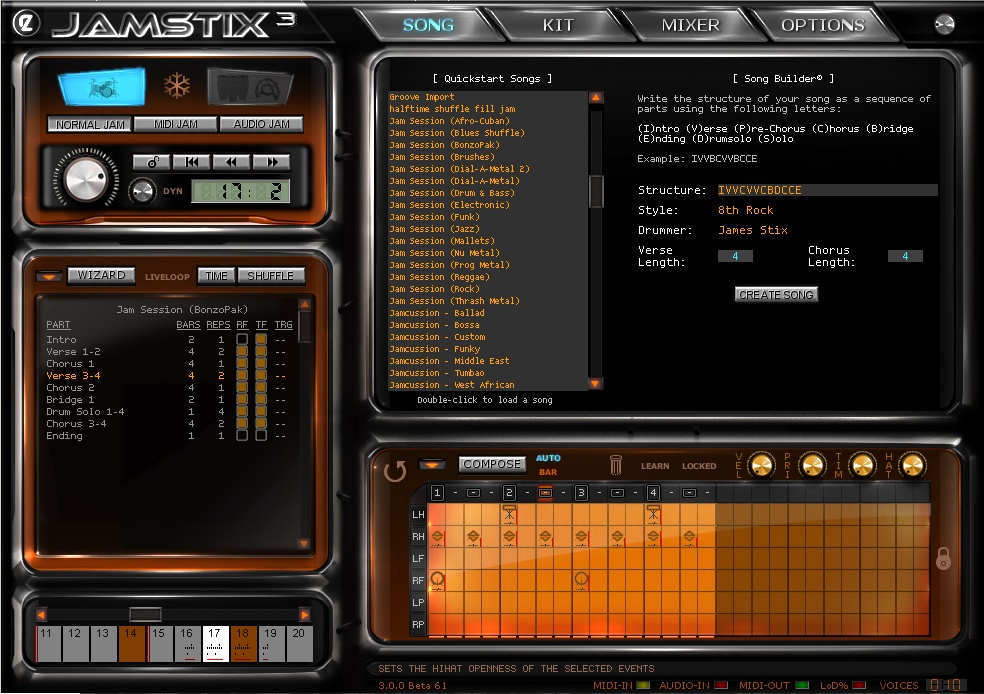
Here is a screenshot of a brand-new feature, called SongBuilder. It replaces the old 'Quickstart' dialog. You can still select quickstart songs from a list as in JS2 but now you can also quickly create a complete song by telling Jamstix the parts you need as a simple letter sequence (V=Verse, C=Chorus etc.). You also specify the bar length of verse and chorus and select a style and drummer. The SongBuilder will create parts as needed, set repetitions and fill types as needed and also adjust brain settings (i.e. 'Chorus' has the power hand threshold set low, 'Drum Solo' has fill length set to max etc.)
_________________
Ralph Zeuner
Rayzoon Technologies LLC
http://www.rayzoon.com |
|
| Back to top |
|
|
jimgue_77
Jammer
Joined: 30 May 2009
Posts: 25
|
| Posted: Fri Oct 02, 2009 4:19 pm Post subject: |
|
|
Looking awesome Ralph!
Is the learning curve expected to be steep from 2.5 to 3? Reason asking is I haven't dove deep into 2.5 and wondering if I should just wait to learn 3 (if its due out soon). Thanks, Jim. |
|
| Back to top |
|
|
Ralph [RZ]
Site Admin
Joined: 02 Jan 2008
Posts: 13332
|
| Posted: Fri Oct 02, 2009 4:51 pm Post subject: |
|
|
I'd say the learning curve from 2.5 to 3 is minimal. The basic concepts are the same. However, if you can wait then that may be best. You could also jump in with the JS3 beta, which will be out in a few weeks.
_________________
Ralph Zeuner
Rayzoon Technologies LLC
http://www.rayzoon.com |
|
| Back to top |
|
|
Harley_
Junior Jammer

Joined: 01 May 2009
Posts: 6
|
| Posted: Fri Oct 02, 2009 5:27 pm Post subject: |
|
|
"I'd say the learning curve from 2.5 to 3 is minimal."
That is a good thing,Ralph 
How about if one could choose from 2 main diferent color themes,?..
Best regards |
|
| Back to top |
|
|
Ralph [RZ]
Site Admin
Joined: 02 Jan 2008
Posts: 13332
|
| Posted: Fri Oct 02, 2009 5:31 pm Post subject: |
|
|
At this time we're just trying to get the darn thing done and out the door 
Skinning will be revisited in JS4.
_________________
Ralph Zeuner
Rayzoon Technologies LLC
http://www.rayzoon.com |
|
| Back to top |
|
|
bradbush
Jammer
Joined: 03 Sep 2007
Posts: 49
|
| Posted: Fri Oct 02, 2009 9:30 pm Post subject: |
|
|
| That song structure deal is one of the best features you have ever done Ralph. |
|
| Back to top |
|
|
|
|
You cannot post new topics in this forum
You cannot reply to topics in this forum
You cannot edit your posts in this forum
You cannot delete your posts in this forum
You cannot vote in polls in this forum
|
Powered by phpBB © 2001, 2002 phpBB Group
|

 FAQ
FAQ Search
 Memberlist
 Usergroups
 Register
 Profile
 Log in to check your private messages
 Log in


