| View previous topic :: View next topic |
| Author |
Message |
smudge
Junior Jammer

Joined: 27 Sep 2005
Posts: 18
Location: UK
|
 Posted: Fri May 15, 2009 5:41 am Post subject: Drag and drop Posted: Fri May 15, 2009 5:41 am Post subject: Drag and drop |
 |
|
First let me thankyou for drummer Mark, great addition.
| Quote: | MIDI clips can now be dragged onto the brain. If the part has a groove importer it will be used, otherwise one is added. If multiple clips are dropped, successive parts will be used
MIDI clips can also be dragged onto bars in the timeline where a straight MIDI import of the corresponding part is performed. If multiple clips are dropped, successive parts will be used |
I am revisiting some old songs and the drums are one long midi file in SX3, i have cut them into in/verse/chorus sections and export the midi files to a folder then import back into Jamstix, this is all working fine with no problems.
To be able to drag those files from SX3 straight into Jamstix would save a lot of work but they wont drag into the timeline or brain. (groove import is active) am I missing something?I can drag the files around but when dropped on timeline or brain nothing happens.
2.5.2 beta 3
Is there a limit to how many bars long for a midi file import? I have tried up to 32 bars so far with no problem.
Thanks in advance |
|
| Back to top |
|
 |
Ralph [RZ]
Site Admin

Joined: 02 Jan 2008
Posts: 13332
|
| Posted: Fri May 15, 2009 7:09 am Post subject: |
|
|
You can drag&drop anywhere in thre brain background area. Try dragging onto the yellow area left or right from the 'Halftime' button and tell me what happens.
Import is limited to 64 bars.
_________________
Ralph Zeuner
Rayzoon Technologies LLC
http://www.rayzoon.com |
|
| Back to top |
|
|
smudge
Junior Jammer
Joined: 27 Sep 2005
Posts: 18
Location: UK
|
| Posted: Fri May 15, 2009 7:27 am Post subject: |
|
|
| No luck Ralph, as soon as the file hits Jamstix gui it turns into that circle with a line through and wont drop anywhere. |
|
| Back to top |
|
|
Ralph [RZ]
Site Admin
Joined: 02 Jan 2008
Posts: 13332
|
| Posted: Fri May 15, 2009 1:55 pm Post subject: |
|
|
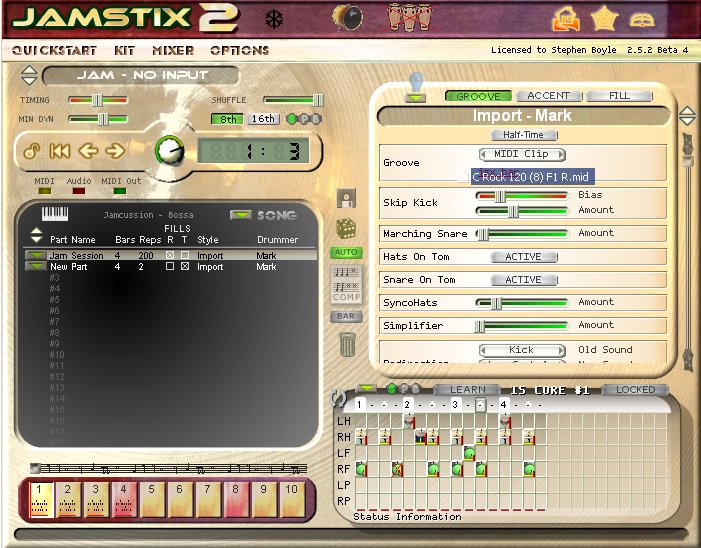
This is what it looks like for me. The cursor (not visible in the image) changes to include the dragged file name (visible) when it can be dropped.
_________________
Ralph Zeuner
Rayzoon Technologies LLC
http://www.rayzoon.com |
|
| Back to top |
|
|
smudge
Junior Jammer
Joined: 27 Sep 2005
Posts: 18
Location: UK
|
| Posted: Sat May 16, 2009 1:48 am Post subject: |
|
|
Not happening here Ralph.
The cursor does not change, my setup looks the same as yours except beta 3.
Have just reinstalled 2.5.1 and then latest beta but still no change. |
|
| Back to top |
|
|
Ralph [RZ]
Site Admin
Joined: 02 Jan 2008
Posts: 13332
|
| Posted: Thu May 21, 2009 1:29 pm Post subject: |
|
|
Are you dragging from Explorer or the host?
_________________
Ralph Zeuner
Rayzoon Technologies LLC
http://www.rayzoon.com |
|
| Back to top |
|
|
smudge
Junior Jammer
Joined: 27 Sep 2005
Posts: 18
Location: UK
|
| Posted: Fri May 22, 2009 3:10 am Post subject: |
|
|
| From the host Ralph,,,,,SX3 |
|
| Back to top |
|
|
phillix
Junior Jammer
Joined: 03 Apr 2008
Posts: 3
Location: London
|
| Posted: Fri May 22, 2009 5:41 am Post subject: |
|
|
Hi
Just trying out Beta 5 and I'm having exactly the same problem in SX3.
Can't drop on timeline or brain.
Cheers
Philip |
|
| Back to top |
|
|
Ralph [RZ]
Site Admin
Joined: 02 Jan 2008
Posts: 13332
|
| Posted: Fri May 22, 2009 9:16 am Post subject: |
|
|
Seems to be SX3 problem. I can't even drag to Explorer with it.
_________________
Ralph Zeuner
Rayzoon Technologies LLC
http://www.rayzoon.com |
|
| Back to top |
|
|
hitch_
Junior Jammer
Joined: 03 Jan 2009
Posts: 18
|
| Posted: Tue May 26, 2009 1:28 pm Post subject: |
|
|
Ralph, I have Reaper and can't drag and drop a MIDI file into the brain. The cursor doesn't change. More work for you.   |
|
| Back to top |
|
|
Ralph [RZ]
Site Admin
Joined: 02 Jan 2008
Posts: 13332
|
| Posted: Tue May 26, 2009 1:59 pm Post subject: |
|
|
It's the same thing. The rule is: if you can drag-&-drop from the host to the Windows Explorer, then it will also work with Jamstix.
_________________
Ralph Zeuner
Rayzoon Technologies LLC
http://www.rayzoon.com |
|
| Back to top |
|
|
hitch_
Junior Jammer
Joined: 03 Jan 2009
Posts: 18
|
| Posted: Tue May 26, 2009 5:10 pm Post subject: |
|
|
Ralph,
Drag & Drop from Jamstix to Reaper's media explorer = 
D&D from Jamstix to a Reaper track =
D&D from Reaper's media explorer to Jamstix =
Too many emoticons? |
|
| Back to top |
|
|
|

 FAQ
FAQ Search
 Memberlist
 Usergroups
 Register
 Profile
 Log in to check your private messages
 Log in


