| View previous topic :: View next topic |
| Author |
Message |
Sheppol_A
PhD in Jamology

Joined: 04 Dec 2008
Posts: 425
|
 Posted: Fri Dec 12, 2008 10:38 am Post subject: JS Stops/pauses when Editing VSTs Posted: Fri Dec 12, 2008 10:38 am Post subject: JS Stops/pauses when Editing VSTs |
 |
|
If I have JS playing on a track and on that track I have any VSTs and want to edit i.e and EQ VST and I move any sliders JS stops playing but the rest of the audio keeps playing.Also and may be related on shutting down the FX window in Reaper it does the same.
I have found a work round by not using ANY VSTs on the same track and routing JS audio from the track to a new track and adding the VSTs there but this problem does NOT occur with any other drum software I use?
This is regardless of mode e.g If I am in Jam no input/Jam with midi etc.
I have spent a good 8 hours plus over the week trying to sort this including forum research and every possible parameter change I can do in Reaper.
However further to this I have a project that doesn't do this but the midi track was created by hand and before I used JS in Drum module mode.
I can zip up the midi files/JS songs and rzd.log files if required? |
|
| Back to top |
|
 |
Ralph [RZ]
Site Admin

Joined: 02 Jan 2008
Posts: 13332
|
| Posted: Fri Dec 12, 2008 11:50 am Post subject: Re: JS Stops/pauses when Editing VSTs |
|
|
| Sheppol_A wrote: | If I have JS playing on a track and on that track I have any VSTs and want to edit i.e and EQ VST and I move any sliders JS stops playing but the rest of the audio keeps playing.Also and may be related on shutting down the FX window in Reaper it does the same.
|
Can you send a REAPER project that does this?
_________________
Ralph Zeuner
Rayzoon Technologies LLC
http://www.rayzoon.com |
|
| Back to top |
|
|
Sheppol_A
PhD in Jamology
Joined: 04 Dec 2008
Posts: 425
|
| Posted: Fri Dec 12, 2008 12:36 pm Post subject: |
|
|
No problem.
Here's the link,
http://stashbox.org/322979/UnResolved.zip
I can pack the full project if you need to less than 10 meg including extra free VSTs used?
Freeverbtoo and SF2 sample player/Bigtick delay and Impulse by Bojo software but the problem occurs even with the Reaper supllied VSTs
AMD 3800+
1Gig of RAM 797 in use when project playing.
WinXP pro SP3 |
|
| Back to top |
|
|
Ralph [RZ]
Site Admin
Joined: 02 Jan 2008
Posts: 13332
|
| Posted: Fri Dec 12, 2008 1:05 pm Post subject: |
|
|
It appears that REAPER requests the data set from Jamstix while you are moving the sliders of the other FX plugin. The Jamstix data set is complex and the pause you notice is due to the data being assembled and sent to REAPER. I'll send you a test Build in a few minutes that will suppress the data collection when the host is REAPER and it is playing. That oughta fix it.
EDIT: Just sent the Build...
_________________
Ralph Zeuner
Rayzoon Technologies LLC
http://www.rayzoon.com |
|
| Back to top |
|
|
Sheppol_A
PhD in Jamology
Joined: 04 Dec 2008
Posts: 425
|
| Posted: Fri Dec 12, 2008 4:12 pm Post subject: |
|
|
Received with gratitude and all's well with the fix 
Fantastic support  |
|
| Back to top |
|
|
Sheppol_A
PhD in Jamology
Joined: 04 Dec 2008
Posts: 425
|
| Posted: Sun Dec 14, 2008 9:32 am Post subject: |
|
|
Just to add.I had to delete the old drum track and make new and then the VST problem seems fixed.
I do however still have a delay when shutting the FX window down(Reaper).
I've also noticed that when I 1st load a project and start it to play the drums play ok but when I click on that drum track I have to wait again as JS seems to load again? |
|
| Back to top |
|
|
Ralph [RZ]
Site Admin
Joined: 02 Jan 2008
Posts: 13332
|
| Posted: Sun Dec 14, 2008 12:21 pm Post subject: |
|
|
Makre sure 'Cache GUI' is checked in the 'Options'.
_________________
Ralph Zeuner
Rayzoon Technologies LLC
http://www.rayzoon.com |
|
| Back to top |
|
|
Sheppol_A
PhD in Jamology
Joined: 04 Dec 2008
Posts: 425
|
| Posted: Sun Dec 14, 2008 3:28 pm Post subject: |
|
|
| Ralph [RZ] wrote: | | Makre sure 'Cache GUI' is checked in the 'Options'. |
Thanks Ray.That was one of my 1st actions to check and it has always been on |
|
| Back to top |
|
|
Sheppol_A
PhD in Jamology
Joined: 04 Dec 2008
Posts: 425
|
| Posted: Tue Dec 23, 2008 3:47 pm Post subject: |
|
|
I'm still getting the delays and they are starting to get frustrating.Even making a new drum track only lasted for a while.The drum track in this present project was created using Jam No Input and then dragged and dropped onto a track in Reaper and then some manual midi editing.
I've stripped all the other parts out of the project as a test and it's still doing it.I have zipped up the project as it's now only 276kb and is here inc log file.
http://www.box.net/shared/o0mbut7qed
I've tried most settings in Reaper but still to no avail.I'd really like to get to the bottom of this.
Thanks |
|
| Back to top |
|
|
Ralph [RZ]
Site Admin
Joined: 02 Jan 2008
Posts: 13332
|
| Posted: Tue Dec 23, 2008 3:56 pm Post subject: |
|
|
Here is what I did with your project (REAPER 2.52 & JS 2.5.0B):
1) Open FX on the track and click on Jamstix. There is a 5 second delay since the GUI has to be initialized. After that repeated switching between the EQ GUI and Jamstix GUI on the track is immediate with no delay since the GUI is now cached.
2) While playing the project I move the 'Gain' slider of the EQ on the JS track and am not getting any audio issues or delays.
Do I need to do something additionally to produce the problem?
_________________
Ralph Zeuner
Rayzoon Technologies LLC
http://www.rayzoon.com |
|
| Back to top |
|
|
Sheppol_A
PhD in Jamology
Joined: 04 Dec 2008
Posts: 425
|
| Posted: Wed Dec 24, 2008 2:33 am Post subject: |
|
|
I've just discovered something that may lead somewhere.If I revert back to the Jam No Input mode on the track the delays go including changing the parameters in the Eq/VSTs.This is unfortunately no good to me as this mode does not play the hand programmed parts I've added to the track.
Note:In the main project I'm working on the delays are still there no matter what I do 
I would have tried to have done all the parts in the JNI mode midi editor but cannot work out how to put individual drums in and I don't mean copy I mean hand place them in and the JS midi box is very small and hard to work in compared with a standard track midi editor.
Further to this left the CPU monitor open and took a Print Screen,
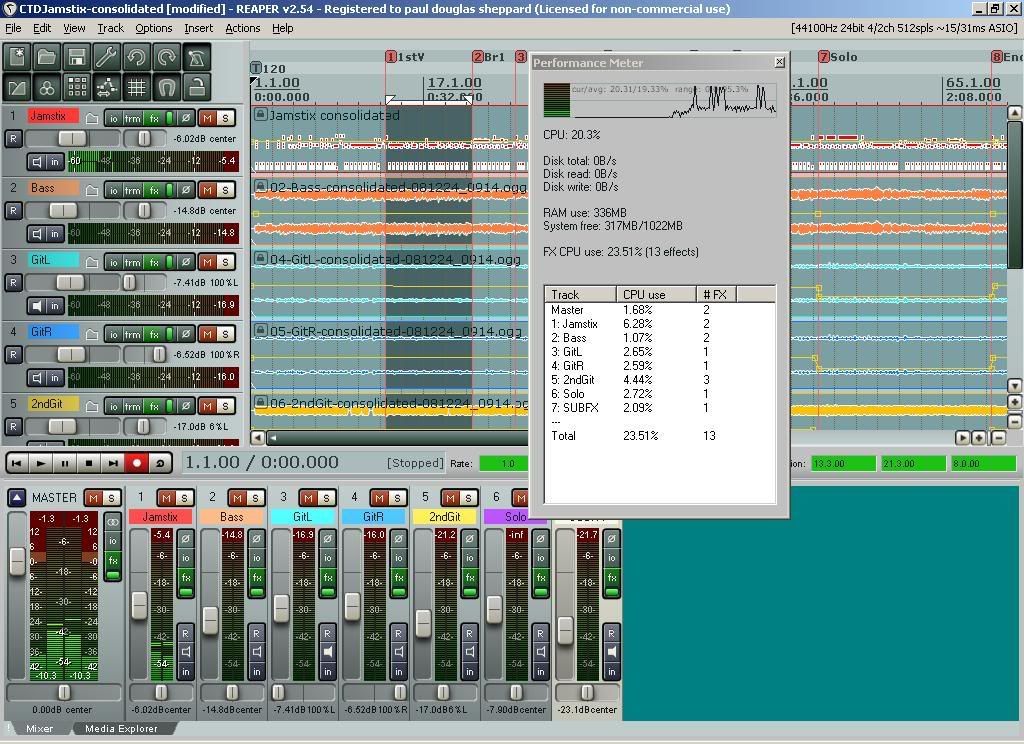
The delays and spikes in this project are when I move any VST parameter
in Reaper on the JS track and when I close the JS on the track.The delay does not happen when opening JS on the track after it's loaded the 1st time. |
|
| Back to top |
|
|
Sheppol_A
PhD in Jamology
Joined: 04 Dec 2008
Posts: 425
|
| Posted: Wed Dec 24, 2008 4:59 am Post subject: |
|
|
I think I have found the problem.When I made the midi track in the JNI mode and then dragged it over and hand edited it and then played it in
Drum Module Mode(DDM) I moved the midi track forward a couple of bars in the song in Reaper as I wanted a few bars of silence.This seems to have caused a problem between JS and Reaper.
There must be a sync problem between the printed midi track and the two JS drum modes if you move the midi track in the DAW.
If this helps you or anyone or a way of avoiding this in the future apart from NOT moving the midi track please let me know
Still testing as we speak but all seems ok again |
|
| Back to top |
|
|
Sheppol_A
PhD in Jamology
Joined: 04 Dec 2008
Posts: 425
|
| Posted: Wed Dec 24, 2008 5:32 am Post subject: |
|
|
Nope.It's back
But weird that when the song is now playing in JNIM it doesn't do it but as soon as you stop the song the delays are back.The delays are there in DM mode.
Also unless I leave JS in JNI mode it does not save it's configuration e.g if I leave it in DM mode and save and re-load the song I have to re-load the JS saved song as well
 |
|
| Back to top |
|
|
Ralph [RZ]
Site Admin
Joined: 02 Jan 2008
Posts: 13332
|
| Posted: Wed Dec 24, 2008 9:15 am Post subject: |
|
|
Here's the thing. REAPER requests the data block of a VST on many occasions, such as when you simply close a track FX window. Most other hosts do not do this and only request the data block when the project is actually being saved. Unlike simple synth plugins, the Jamstix data block is very complex and building it every time REAPER calls for it is causing the delays you noticed.
If anyone knows of a way to stop REAPER from making all these superfluous data requests, that would be the best way to fix it.
I can send you a work-around where Jamstix does not send the data block unless the CTRL key is held down. This will fix all your delays but you'll have to remember to hold down the CTRL key when manually saving the project.
_________________
Ralph Zeuner
Rayzoon Technologies LLC
http://www.rayzoon.com |
|
| Back to top |
|
|
Sheppol_A
PhD in Jamology
Joined: 04 Dec 2008
Posts: 425
|
| Posted: Wed Dec 24, 2008 9:22 am Post subject: |
|
|
Actually I have now stripped the project and added back everything and have it pretty much beat(Don't know how) but I have only one hurdle now.
In this renewed project I don't get any more delays but when I save the project with JS in Drum Module Mode and then re-load the project I don't get any drum sounds.The JS Wizard comes up when I hit the FX button on the track and I have to re-load the JS song that I have saved when I was in
Drum No Input mode?
Remembering that I have the drums as a midi file on the JS track. |
|
| Back to top |
|
|
|

 FAQ
FAQ Search
 Memberlist
 Usergroups
 Register
 Profile
 Log in to check your private messages
 Log in


