| View previous topic :: View next topic |
| Author |
Message |
clare_bear
Jammer

Joined: 11 Nov 2006
Posts: 30
|
 Posted: Wed Mar 07, 2007 12:40 pm Post subject: Posted: Wed Mar 07, 2007 12:40 pm Post subject: |
 |
|
Not sure if my problem is similar to Thoth's or not:
I'm trying to just program some simple rhythms into JS and I don't want the JS brain to do anything, just play back what I've put in (in the arrangement rhythms). However, when I go to play it back (with Mute Brain selected), no sound comes out - it's following the arrangement though. When I unselect Mute Brain there is sound, but of course it's improving my rhythm.
Cheers
Clare |
|
| Back to top |
|
 |
Ralph [RZ]
Site Admin

Joined: 02 Jan 2008
Posts: 13332
|
| Posted: Wed Mar 07, 2007 12:52 pm Post subject: |
|
|
'Mute Brain' is used when you are feeding Jamstix MIDI drum data on its MIDI input. Without that input, you will only get silence.
Try this instead:
- Use Manual Jam
- Clear any fills your arrangement might have at this time
- Move 'Fill Frequency' in jam tab to 0
- Move 'Accent sliders in the tom and snare panels of all rhythms that you are using to 0, same with 'Normal' slider of the cymbal panel
This should give you no 'fancy stuff' from the brain.
_________________
Ralph Zeuner
Rayzoon Technologies LLC
http://www.rayzoon.com |
|
| Back to top |
|
|
clare_bear
Jammer
Joined: 11 Nov 2006
Posts: 30
|
| Posted: Wed Mar 07, 2007 2:40 pm Post subject: |
|
|
Ah, right!
Thanks very much, I'll give that a try (then I'll probably get JS to make it a bit more interesting anyway   ) ) |
|
| Back to top |
|
|
Thoth
Junior Jammer

Joined: 03 Mar 2007
Posts: 3
|
| Posted: Thu Mar 08, 2007 4:26 pm Post subject: More idiotic questions :D |
|
|
Well, I think I've got Jamstix working decently with Tracktion (although I see there's a volume fix to download from a post above, which I'll do). But there is one small issue.
Whenever I start my recording, I have it count time for a couple of bars. It seems that Jamstix doesn't start in immediately after the eight-count. There's a bit of delay before it starts to play along with me, and it's not because I have a particular key assigned to start the jam. It hesistates for maybe no more than half a second, but it's enough to subtly throw things off.
Any advice?
Brian |
|
| Back to top |
|
|
Ralph [RZ]
Site Admin
Joined: 02 Jan 2008
Posts: 13332
|
| Posted: Thu Mar 08, 2007 4:32 pm Post subject: |
|
|
There is a synch-up with the host that happens when JS starts. Look at the output tab and make sure 'Time Sig Changes' is NOT checked. If you still have the problem, leave a bar of silence at the beginning of your song for the synch-up.
_________________
Ralph Zeuner
Rayzoon Technologies LLC
http://www.rayzoon.com |
|
| Back to top |
|
|
clare_bear
Jammer
Joined: 11 Nov 2006
Posts: 30
|
| Posted: Fri Nov 16, 2007 5:40 pm Post subject: |
|
|
| dto wrote: | Ahh -- I've got it now!
I was previously doing the following:- Set Jamstix to have 4 outputs
- Map drums and cymbals to various Jamstix outputs
- Wrap Jamstix in a rack
- Connect outputs 1-4 from Jamstix to the respective output nodes in the rack
- Drop that rack in 4 different tracks
- In the rack properties for track #1, set "left output comes from" and "right output comes from" both to Output #1
- In the rack properties for track #2, set "left output comes from" and "right output comes from" both to Output #2
- Repeat for tracks #3 and #4
What works is to connect all 8 available output nodes in the 4th step above (not just the first 4), and then:- In the rack properties for track #1, set "left output comes from" to Output #1 and "right output comes from" to Output #2
- In the rack properties for track #2, set "left output comes from" to Output #3 and "right output comes from" to Output #4
- In the rack properties for track #3, set "left output comes from" to Output #5 and "right output comes from" to Output #6
- In the rack properties for track #4, set "left output comes from" to Output #7 and "right output comes from" to Output #8
I know that's probably hard to read.  Basically, I wasn't treating each Jamstix output in the rack as one-half of a stereo pair. However, with it set up like I describe above it works as advertised even using MIDI input. Basically, I wasn't treating each Jamstix output in the rack as one-half of a stereo pair. However, with it set up like I describe above it works as advertised even using MIDI input.
Hopefully this helps someone else down the road. |
Hi All
With regards to using a rack filter as above, I've been having some difficulty and I can't seem to work out the problem.
I'm using Tracktion 2 and trying to split the individual drum sounds from my Jamstix 2 into 8 parts (kick, snare, toms, etc - from the mixer output/kit screens).
As far as I can see, I've set it all up correctly, with instances of the rack on each individual drum track, and left and right outputs on the rack to the appropriate drum track. The track for the kick drum (the first output from the VSTi) works as expected, but the others seem to go through the 'kick' track too. This is really hard to explain, so I hope that makes some sort of sense! Here's a screen dump if that helps:
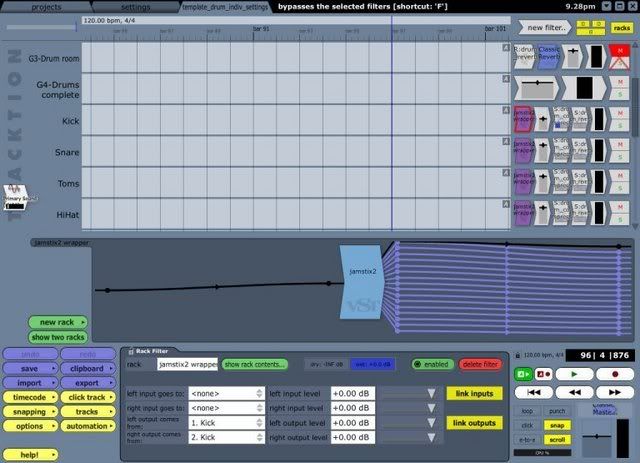
Any ideas why the other tracks routed through the filter seem to be going through the kick track first? It all looks OK, and I can't think of anything else to try!
Sorry if this makes no sense, but I'm finding it very hard to explain! |
|
| Back to top |
|
|
Ralph [RZ]
Site Admin
Joined: 02 Jan 2008
Posts: 13332
|
| Posted: Fri Nov 16, 2007 6:32 pm Post subject: |
|
|
You also need to tell Jamstix where you want each sound to go. As a shortcut to get you going quickly: click the menu icon in the kit window and select 'Set Output Rotuing - 8 -...'
_________________
Ralph Zeuner
Rayzoon Technologies LLC
http://www.rayzoon.com |
|
| Back to top |
|
|
clare_bear
Jammer
Joined: 11 Nov 2006
Posts: 30
|
| Posted: Sat Nov 17, 2007 5:14 am Post subject: |
|
|
| Ralph [RZ] wrote: | | You also need to tell Jamstix where you want each sound to go. As a shortcut to get you going quickly: click the menu icon in the kit window and select 'Set Output Rotuing - 8 -...' |
I've done that, Ralph. Should it automatically name each of the outputs in Tracktion, if I set the output routing?
Someone on a Tracktion forum suggested setting JS outputs to mono rather than stereo, could you tell me how to do that?
I'll keep trying to work out what the problem is in the meantime! I'll start again and see if it's something silly I've done.
Cheers |
|
| Back to top |
|
|
Ralph [RZ]
Site Admin
Joined: 02 Jan 2008
Posts: 13332
|
| Posted: Sat Nov 17, 2007 10:33 am Post subject: |
|
|
You can set the outputs to mono by unchecking 'Stereo Outputs' in the 'Options' of JS2.
_________________
Ralph Zeuner
Rayzoon Technologies LLC
http://www.rayzoon.com |
|
| Back to top |
|
|
clare_bear
Jammer
Joined: 11 Nov 2006
Posts: 30
|
| Posted: Mon Nov 19, 2007 4:27 am Post subject: |
|
|
| Ralph [RZ] wrote: | | You can set the outputs to mono by unchecking 'Stereo Outputs' in the 'Options' of JS2. |
Thanks very much, I'll give that a go later.
WOuld just like to say that the customer support for JS is second to none - keep up the good work, guys  |
|
| Back to top |
|
|
clare_bear
Jammer
Joined: 11 Nov 2006
Posts: 30
|
| Posted: Mon Nov 19, 2007 7:51 am Post subject: |
|
|
Rather embarrassingly, I've found my mistake, and I was just being a bit thick!
I had set up all the outputs correctly both from Jamstix and in Tracktion, but, and it's a big BUT...I had the first track in Tracktion with an instance of the Jamstix wrapper, and left and right outputs set to the kick output  - setting the left and right outputs to none seems to have fixed the problem! - setting the left and right outputs to none seems to have fixed the problem!
Sorry for wasting your time, I feel very silly
Thanks for the help though. |
|
| Back to top |
|
|
dhenriq1
Junior Jammer
Joined: 17 Mar 2008
Posts: 2
|
| Posted: Mon Mar 17, 2008 8:44 pm Post subject: |
|
|
| hey hows it goin, just bought jamstix2 the other day after liking what i heard with addictive drums... when i had the demo version it was working fine, but now all of a sudden when it asks me to switch jamstix to 8 outputs, i'll switch it to eight outputs just like i did with the demo version but now it won't stay.. i'll restart jamstix and still get the same error when i try to open addictive drums up... i'm really itchin to get this goin.. any ideas? |
|
| Back to top |
|
|
Ralph [RZ]
Site Admin
Joined: 02 Jan 2008
Posts: 13332
|
| Posted: Tue Mar 18, 2008 6:53 am Post subject: |
|
|
please do this:
- open your project and go to the JS2 mixer
- set audio outputs to 8
- close your host (just to be sure)
- reopen host and project and tell me what it says now for audio outputs
_________________
Ralph Zeuner
Rayzoon Technologies LLC
http://www.rayzoon.com |
|
| Back to top |
|
|
rockstar_not
Jammer
Joined: 30 Jan 2007
Posts: 30
|
| Posted: Tue May 20, 2008 8:33 am Post subject: Saving Jamstix brain output using Tracktion - best way? |
|
|
I want to know the best way to save the output of the Jamstix brain output, both the midi data as well audio output, using Tracktion.
The way I use Jamstix with Tracktion is to use the same aux send on all tracks that I want to feed the brain.
On a track with a matching aux return, I put AudioM8, then post AudioM8, I put a volume filter set to zero.
That way, I can control which tracks have dominance to the brain with simple automation of the send levels on each of those tracks.
Now - I'd like to store what Jamstix outputs, time aligned with the rest of my project's tracks.
I'd like to know how to do this both with MIDI output from Jamstix, as well as audio output from Jamstix.
Reasons:
1. If I could store off the MIDI output of Jamstix's brain, then I could easily audition different 'jams' for the same song.
2. If I could store off the audio output easily, and time aligned, then I could collaborate easier with other folks by supplying them drum tracks time aligned with tracks they supply to me. Right now, I have to use TapeIt to store the output 'live' to a .wav file, then try to trim the file so it's aligned to the time-line. Very tedious.
Anyone have some novel solutions or have experience with this? |
|
| Back to top |
|
|
gear_head
Jammer
Joined: 12 Jun 2009
Posts: 24
|
| Posted: Fri Jun 12, 2009 11:18 am Post subject: Re: Saving Jamstix brain output using Tracktion - best way? |
|
|
| rockstar_not wrote: | I want to know the best way to save the output of the Jamstix brain output, both the midi data as well audio output, using Tracktion. . .
Now - I'd like to store what Jamstix outputs, time aligned with the rest of my project's tracks.
I'd like to know how to do this both with MIDI output from Jamstix, as well as audio output from Jamstix.
|
Would be very interested in knowing how to do this also.
I just got Tracktion 3 Ultimate Bundle, and while the included, cut down version of Drumcore is servicable, Jamstix has had my interest for quite a while.
Am getting closer to making a decision to either upgrade to full Drumcore or go with Jamstix. Being able to do this would seal the deal for Jamstix.
Jamstix is definitely my preference  |
|
| Back to top |
|
|
|

 FAQ
FAQ Search
 Memberlist
 Usergroups
 Register
 Profile
 Log in to check your private messages
 Log in


