| View previous topic :: View next topic |
| Author |
Message |
Elton_John
Jammer

Joined: 31 Mar 2011
Posts: 34
|
 Posted: Sun Jan 01, 2023 1:17 pm Post subject: Jamstix 4 Manager Problem Posted: Sun Jan 01, 2023 1:17 pm Post subject: Jamstix 4 Manager Problem |
 |
|
Hello. I am using Jamstix 4 (JS4) in Reaper 5.9xx and Cakewalk By BandLab (ver. 2022.112) under Win 10 64-bit.
I successfully downloaded the Jamstix4 Manager, and then used it to update my version of JS3 to JS4. The update appeared to work and JS4 is now running on my computer.
When on the Options page for JS4, if I click on the button marked "Jamstix4 Manager", I get an error message "Jamstix4 Manager cannot be found."
This is curious. I know the JS Installer placed a copy of Jamstix4 Manager in the C:/Program Data/Jamstix folder. Additionally the Win 10 "Start" page has an entry for Jamstix with a subheading for Jamstix4 Manager.
So I can find Jamstix4 Manager on my computer, but JS4 itself cannot. Is this something I can fix? |
|
| Back to top |
|
 |
Azimuth
Moderator & Beta Team

Joined: 19 Nov 2010
Posts: 2131
|
| Posted: Sun Jan 01, 2023 2:40 pm Post subject: |
|
|
| Check C:\ProgramData\Jamstix 4 Data and see if the Jamstix4Manager.exe file is located there. If not, find and copy it there. |
|
| Back to top |
|
|
Elton_John
Jammer
Joined: 31 Mar 2011
Posts: 34
|
| Posted: Sun Jan 01, 2023 2:41 pm Post subject: |
|
|
Update:
So I reviewed the different JS file locations on my computer. I can find no copy of Jamstix4 Manager in the C:/Program Data/Jamstix4 location. Nor can I find a copy of Jamstix4 Manager on my G:/ drive where JS sample data is stored.
I do have a copy of the zipped Jamstix4 Manager download file, and the expanded version that is extracted from the zipped file on my Desktop (leftovers from when I downloaded the Jamstix4 Manager, extracted it, and used it to download and install JS4.)
So if I know where JS4>Options>Launch Jamstix4 Manager button looks for the Jamstix4 Manager file, I can move it to that location. |
|
| Back to top |
|
|
Elton_John
Jammer
Joined: 31 Mar 2011
Posts: 34
|
| Posted: Sun Jan 01, 2023 2:50 pm Post subject: |
|
|
| Thank You Azimuth for your suggestion. I will try it out and see how it works. |
|
| Back to top |
|
|
Elton_John
Jammer
Joined: 31 Mar 2011
Posts: 34
|
| Posted: Sun Jan 01, 2023 3:47 pm Post subject: |
|
|
OK. So I have copied Jamstix4Manager.exe into the folder C:/Program Data/Jamstix4/Data. And then I re-started the computer.
Sadly, I continue to get an error message "Manager tool could not be found" when clicking on the Manager Tool button in the JS Option page. |
|
| Back to top |
|
|
Azimuth
Moderator & Beta Team
Joined: 19 Nov 2010
Posts: 2131
|
| Posted: Sun Jan 01, 2023 4:27 pm Post subject: |
|
|
| You can also try clicking the blue Jamstix logo, Help>Open Manager/Update Tool or Help>About Jamstix and see if any of those work. All 4 choices work on my system in Reaper/Win 10. |
|
| Back to top |
|
|
Azimuth
Moderator & Beta Team
Joined: 19 Nov 2010
Posts: 2131
|
| Posted: Sun Jan 01, 2023 4:48 pm Post subject: |
|
|
| I just thought of something. Check the Security settings for C:\ProgramData\Jamstix 4 Data under Properties and add "Everyone" to the Group or User Names. |
|
| Back to top |
|
|
Elton_John
Jammer
Joined: 31 Mar 2011
Posts: 34
|
| Posted: Sat Jan 07, 2023 3:21 pm Post subject: |
|
|
Hello.
Update:
1) On the JS interface, if I click on Help, and then Launch Manager/Update Tool, I get an error message saying "Manager Tool Could Not Be Found".
2) On the JS interface, if I click on the Jamstix Logo, and then click on the button Launch Manager Tool, I get an error message saying "Manager Tool Could Not Be Found".
3) On Win 10, if I click on the Start Menu, navigate to the JS entry and click on the Jamstix4Manager sub-entry, I get an error message saying "Manager Tool Could Not Be Found", with an option to search for Jamstix4Manager. I know that Jamstix4Manager.exe is located in C:/Program Data/Jamstix/Data folder, and so I select that location. I think the Jamstix 5 Manager application launches: a window appear in which the Title Bar reads "Acknowledgement", the body of the window shows only the text "ERROR", with a button marked OK. Clicking OK closes the window. {Normally, my studio computer is offline, so perhaps the Jamstix 4 Manager application is giving an error because it cannot connect to the server.)
4) I have checked the Security Settings for the folder C:/Program Data/Jamstix/Data - where the Jamstix4Manager.exe is located. The setting is "Everyone".
Jamstix 4 itself is loaded and appears to be functioning normally on my computer. So my failure to launch the Jamstix 4 Manager application is not an urgent issue for me at this time. It might be a bigger problem for me should I decide to add an Expansion Pak. Any suggestions for resolving this problem are appreciated.
Thanks in advance. |
|
| Back to top |
|
|
Azimuth
Moderator & Beta Team
Joined: 19 Nov 2010
Posts: 2131
|
| Posted: Sat Jan 07, 2023 4:26 pm Post subject: |
|
|
On my system, I have 2 separate folders:
1) C:\ProgramData\Jamstix4\Data
2) C:\ProgramData\Jamstix 4 Data
The Jamstix4Manager.exe file is located in the C:\ProgramData\Jamstix 4 Data. From your post it looks like you have it placed in C:\ProgramData\Jamstix4\Data. If I move the file to that location on my system I get the "Manager Tool Could Not Be Found" error. |
|
| Back to top |
|
|
Elton_John
Jammer
Joined: 31 Mar 2011
Posts: 34
|
| Posted: Sun Jan 08, 2023 4:24 pm Post subject: |
|
|
Hello. Thank you Azimuth
Curious. On my Win 10 computer, I only have a C:\Program Data\Jamstix4\Data folder. There is no C:\Program Data\ Jamstix 4 Data folder.
On my Win 10 computer, the Jamstix4Manager.exe application is located in the C:\Program Data\Jamstix4\Data folder.
Are you suggesting I create a C:\Program Data\ Jamstix 4 Data folder, and put a copy of the Jamstix4Manager.exe in it? |
|
| Back to top |
|
|
Azimuth
Moderator & Beta Team
Joined: 19 Nov 2010
Posts: 2131
|
| Posted: Sun Jan 08, 2023 6:50 pm Post subject: |
|
|
| Quote: | | Are you suggesting I create a C:\Program Data\ Jamstix 4 Data folder, and put a copy of the Jamstix4Manager.exe in it? |
Why not, it won't hurt anything. On my computer the C:\ProgramData\Jamstix 4 Data folder contains:
1) a Cache folder
2) a Data folder
3) the Jamstix4Manager.exe file |
|
| Back to top |
|
|
the_big_small
Junior Jammer

Joined: 12 Jan 2023
Posts: 3
|
| Posted: Thu Jan 12, 2023 6:44 pm Post subject: |
|
|
ok i have had similar experience.
specifically, i am having problems installing Jamstix4Manager.exe on Windows 10 LTSC.
i downloaded the file from here:
https://www.rayzoon.com/rayzoon_downloads.html
i tried both 'jamstix 4 free version' and 'jamstix 4 manager' - although it appears they both link to the same file, called Jamstix4Manager.exe. It's about 5.3mb on my computer. is this file size correct?
After downloading, when i double click Jamstix4Manager.exe to install, a window pops up with the heading "Acknowledge" and there is a message that says "error" in below it. This is all that happens - jamstix is not installed.
following this suggestion by Azimuth:
"Check C:\ProgramData\Jamstix 4 Data and see if the Jamstix4Manager.exe file is located there. If not, find and copy it there."
I created the appropriate directory and copied the downloaded file across. this did not fix the issue - i still receive 'acknowledge' and 'error' message as before.
furthermore, following this suggestion by Azimuth:
"I just thought of something. Check the Security settings for C:\ProgramData\Jamstix 4 Data under Properties and add "Everyone" to the Group or User Names."
i could not find "Everyone" in the group or user names, nor could i find out where to add it. however i could see that my user account seemed to have permissions, inherited from ProgramData folder.
I also tried 'run as administrator' on the downloaded file - with the same acknowledge/error result.
does anyone know whether i have the right file ? or how to fix the issue?
thanks! |
|
| Back to top |
|
|
Azimuth
Moderator & Beta Team
Joined: 19 Nov 2010
Posts: 2131
|
| Posted: Thu Jan 12, 2023 7:00 pm Post subject: |
|
|
| Quote: | | called Jamstix4Manager.exe. It's about 5.3mb on my computer. is this file size correct? |
The download is a zip-file. You need to extract it with 7Zip or similar before you run it. The extracted file size is about 11-12MB. |
|
| Back to top |
|
|
the_big_small
Junior Jammer
Joined: 12 Jan 2023
Posts: 3
|
| Posted: Fri Jan 13, 2023 12:06 am Post subject: |
|
|
ah yes sorry i said wrong file size!
as you said, the link is a zip file.
the zip file contains Jamstix4Manager.exe which is about 11mb.
everything else i said still remains, using this 11mb Jamstix4Manager.exe file
here's a screenshot of the error message:
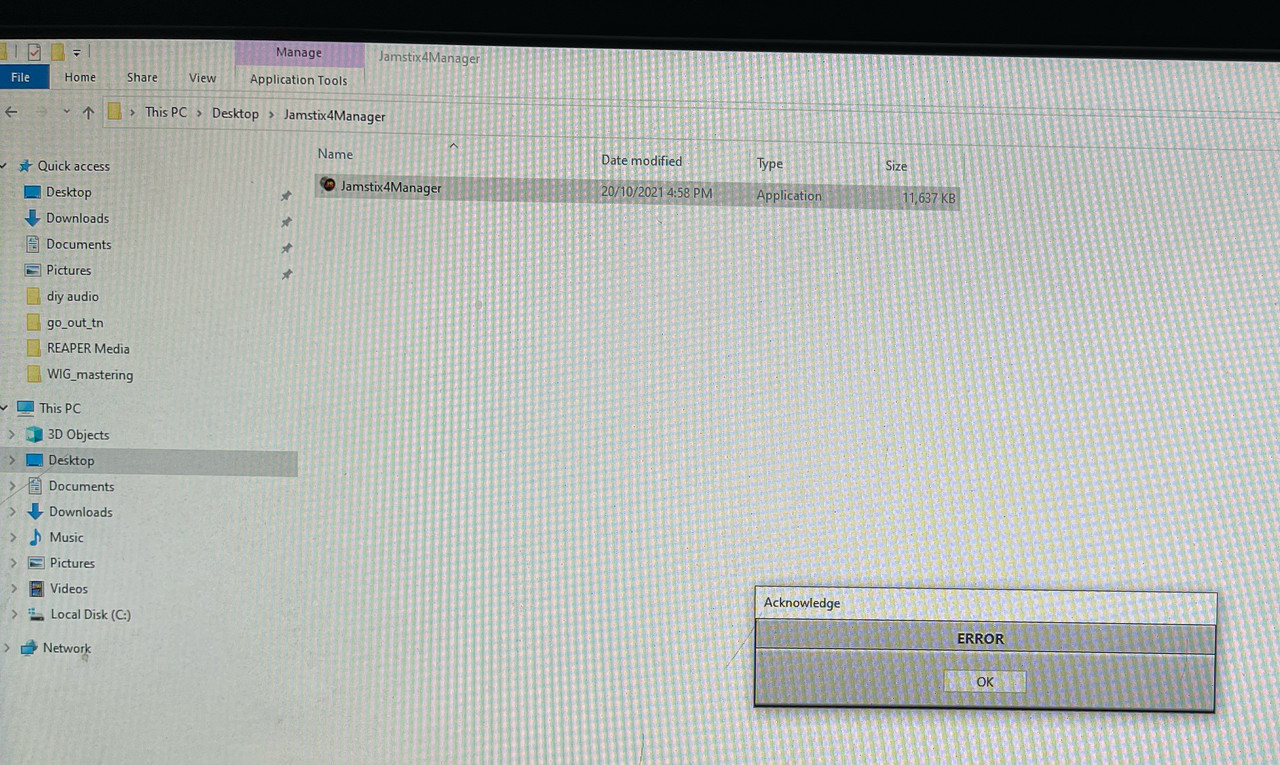
do you know what could be causing this issue? thanks again! |
|
| Back to top |
|
|
Azimuth
Moderator & Beta Team
Joined: 19 Nov 2010
Posts: 2131
|
| Posted: Fri Jan 13, 2023 6:56 am Post subject: |
|
|
| The only way I can recreate that error is to kill my net access when running the Manager app. Are you online? |
|
| Back to top |
|
|
|

 FAQ
FAQ Search
 Memberlist
 Usergroups
 Register
 Profile
 Log in to check your private messages
 Log in


