| View previous topic :: View next topic |
| Author |
Message |
rjd_5974
Junior Jammer

Joined: 10 Oct 2012
Posts: 10
|
 Posted: Wed Jan 02, 2013 10:14 pm Post subject: At my wits end with MIDI Export..SOLVED Posted: Wed Jan 02, 2013 10:14 pm Post subject: At my wits end with MIDI Export..SOLVED |
 |
|
The only problem I've ever had with this great program has been exporting MIDI to an external DAW. I've tried several suggestions such as letting the clip to be exported play through all the way, but often I run into trouble. Once in a while things seem to work seamlessly, but more often than not it gives me a big headache. It's probably something simple I'm overlooking.
Here's an example of what I get..notice the big chunk of missing MIDI in the imported MIDI file:
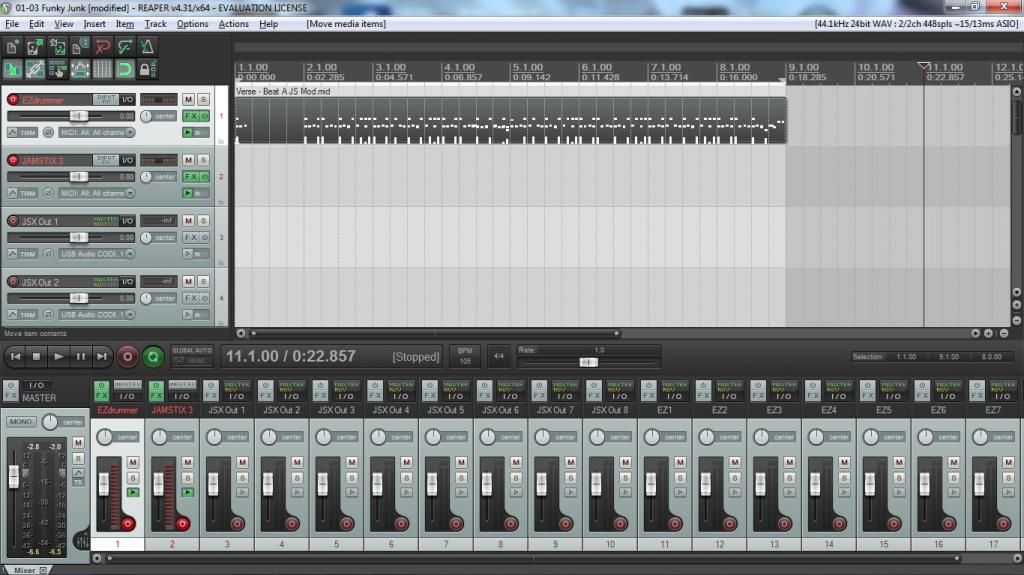
And this was all pre-composed already. In fact it was all imported directly to Jamstix with nothing but feel processing and a couple fills generated by JS. Sometimes the gap will be in different places in the exported file. I've tried exporting by right clicking on the Part name...I've tried using the drop down arrow next to the Wizard button..but something always seems off.
What could I be doing wrong here? |
|
| Back to top |
|
 |
rjd_5974
Junior Jammer
Joined: 10 Oct 2012
Posts: 10
|
| Posted: Wed Jan 02, 2013 10:49 pm Post subject: |
|
|
It must have been the typing out of the problem that finally jogged something as this has been beating me down for a while now..but I think I finally figured out my problem. I'll post it here for future reference as I've seen this problem mentioned on here before.
You have to check off "Enable Song Looping" in the options when you are exporting Midi. Otherwise the song will start looping back and there will be gaps in the MIDI at the point you stopped playback like in my image above when you try and import it back to your DAW.
I always had this feature ticked on as I would like to hear changes as I made them throughout a section. Gotta turn it off before exporting though!
Hopefully my foolishness will now help somebody else. |
|
| Back to top |
|
|
Ralph [RZ]
Site Admin

Joined: 02 Jan 2008
Posts: 13332
|
| Posted: Thu Jan 03, 2013 9:44 am Post subject: |
|
|
Hadn't even tought of that! Thanks!
_________________
Ralph Zeuner
Rayzoon Technologies LLC
http://www.rayzoon.com |
|
| Back to top |
|
|
ukm
Jam Meister

Joined: 27 Mar 2005
Posts: 53
Location: Germany
|
| Posted: Fri Apr 05, 2013 5:24 pm Post subject: |
|
|
That's weird. I just had this problem here too but "Enable song looping" was OFF.
I enabled it and tried to export MIDI data again. This time the data were complete.
(Win7 64Bit, Studio One 2.5 64Bit) |
|
| Back to top |
|
|
|

 FAQ
FAQ Search
 Memberlist
 Usergroups
 Register
 Profile
 Log in to check your private messages
 Log in


