| View previous topic :: View next topic |
| Author |
Message |
mobiuskoan_1
Junior Jammer

Joined: 22 Dec 2010
Posts: 5
|
 Posted: Wed Dec 22, 2010 11:32 pm Post subject: downloaded the demo... I'm lost! Posted: Wed Dec 22, 2010 11:32 pm Post subject: downloaded the demo... I'm lost! |
 |
|
I'm using Tracktion 2. finally got to where I can click on the drums in the kit tab and they actually respond (that's the good news). The bad news is that I'm not sure what to do next. I've clicked on the Wizard button, selected a quick start song, clicked the little button with the lock on it (just below the button labeled "midi jam"), but nothing happens.
I keep expecting a severely cool drum track to start playing (like in the demo video), but nothing ever happens.
Cluelessly, Mike |
|
| Back to top |
|
 |
studio64
Grand Master Jam

Joined: 24 Mar 2005
Posts: 200
Location: Leicester UK
|
| Posted: Thu Dec 23, 2010 2:45 am Post subject: |
|
|
Hi mobiuskoan_1
Is that with Tracktion play button activated?
Basic instructions, Open Jamstix as a VST instrument in Tracktion
Open a song from the JS3 Wizard ( you should see kit loading)
Click on the play button in Tracktion.
Adjust the tempo in Tracktion.
I hope this helps, come back if you need any more help.
regards
_________________
john-studio64
Intel i7-2600 3.4 16g Ram
Cubase6 |
|
| Back to top |
|
|
Sheppol_A
PhD in Jamology

Joined: 04 Dec 2008
Posts: 425
|
| Posted: Thu Dec 23, 2010 10:43 am Post subject: |
|
|
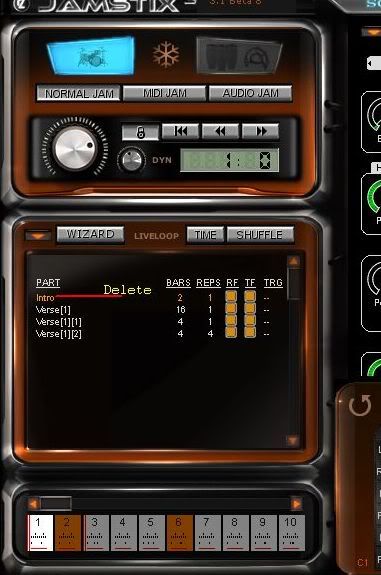
A lot of the songs come with a 2 bar blank intro.Delete this in the Song editor.Then the drums will play from the start of the track.
 |
|
| Back to top |
|
|
mobiuskoan_1
Junior Jammer
Joined: 22 Dec 2010
Posts: 5
|
| Posted: Thu Dec 23, 2010 11:46 am Post subject: |
|
|
| Cool! Thanks guys. |
|
| Back to top |
|
|
|

 FAQ
FAQ Search
 Memberlist
 Usergroups
 Register
 Profile
 Log in to check your private messages
 Log in


